Embedding via interfaces
The entire virtualization principle of the TF8560 Plastic Technology Functions is based on the use of interfaces. Therefore, the library provides a corresponding INTERFACE for each axis type and common base types. For a general description of interfaces, see the INTERFACE concept in TwinCAT PLC programming.
Application-specific abstraction
When integrating a TF8560 axis into an application, it is recommended to select the interface with the largest overlap in variants. Specifically, this can be illustrated by the following use cases:
- For the carriage unit in a blow molding application, the appropriate interface, I_AxisBase, should be preferred.
- This makes it possible to operate the carriage axis both hydraulically and electrically, regardless of the machine-specific configuration. In addition, it is possible to switch flexibly between an electrically linear axis and an electrically transforming axis.
- For the removal gripper of any plastics machine, the I_MotionBase interface would be the preferred choice.
- This makes it possible to use both digitally controllable pneumatic and hydraulic cylinders for control purposes. Furthermore, it is also possible to configure an electric servo axis that can use the same jog commands to move between the end positions.
Beyond their purpose of abstraction, the interfaces for each axis type offer a pre-filtered choice of axis functions, which significantly simplifies IntelliSense-guided programming in TwinCAT.
Therefore, do not access an axis directly in your program code; instead, use interfaces and initialize them with the appropriate axis instances.
fPosition := fbNcAxis1.Actuals.Position   // not preferred
fPosition := iAxisBase.Actuals.Position   // preferred
Querying the axis type and variant-specific handling
In some cases, despite the abstraction provided by, for example, I_AxisBase, the specific functionality of a particular axis type may be required. For example, this can occur with hydraulic axes when the characteristic curve measurement is about to begin. In this case, access to an I_AxisBase interface is sufficient. Using the system function QUERYINTERFACE, you can run this query and gain access at the same time:
In the following example, the return value of the QUERYINTERFACE statement indicates whether the instance behind iAxisBase is compatible with the iAxisHydraulicBase interface (I_AxisHydraulicBase). This applies, for example, to an FB_AxisHydraulicBase. Accordingly, this statement can be used to check whether a hydraulic axis is defined in iAxisBase. If this is the case (__QUERYINTERFACE(…) = TRUE), the interface to be tested can be accessed directly, since the axis is already assigned during the check performed by QUERYINTERFACE.
IF __QUERYINTERFACE(iAxisBase, iAxisHydraulicBase) THEN
    iAxisHydraulicBase.AutoIdent.DoAutoIdent(TRUE);
ELSE
    ;    // Axis is not hydraulic
END_IF
For more information on the QUERYINTERFACE() function, see the corresponding section in the TwinCAT documentation.
To provide full access to an axis, each axis interface provided also includes an extended Dev variant. This should generally not be used, as it makes all properties and methods of an axis available. Among these are also some that are not intended for regular use by the application.
Available interfaces overview
The following UML diagram shows the available interfaces of the individual axes and their inheritance structure.
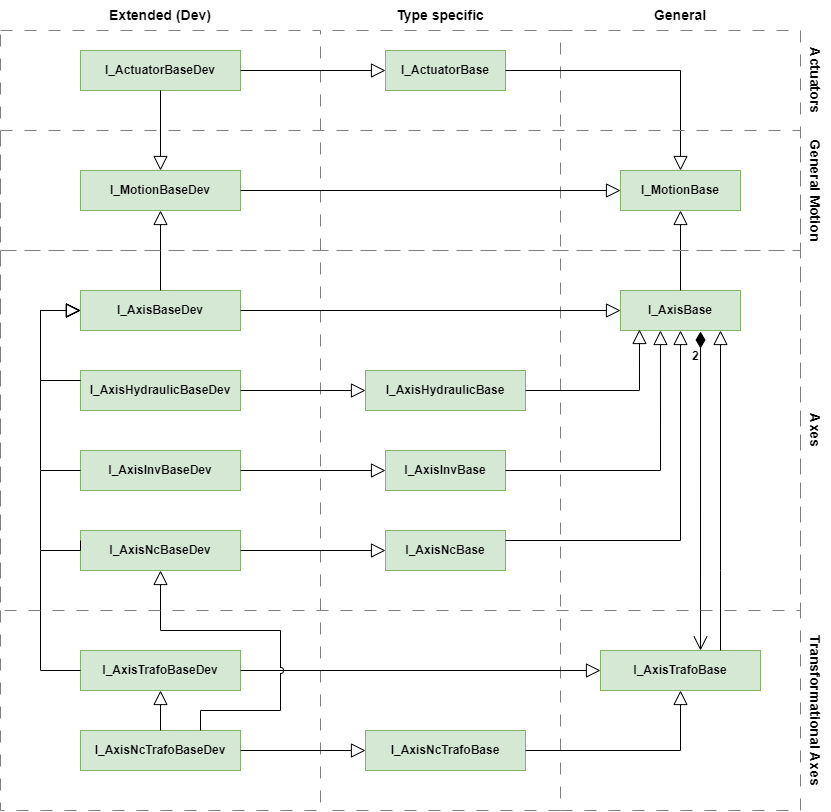
Name | Description |
|---|---|
General motion unit | |
General axis | |
NC-based axis | |
Hydraulic-based axis. . | |
Inverter-based axis | |
General transformation axis | |
NC-based transformation axis | |
Digital linear actuator | |