Injection axis
Injection.content
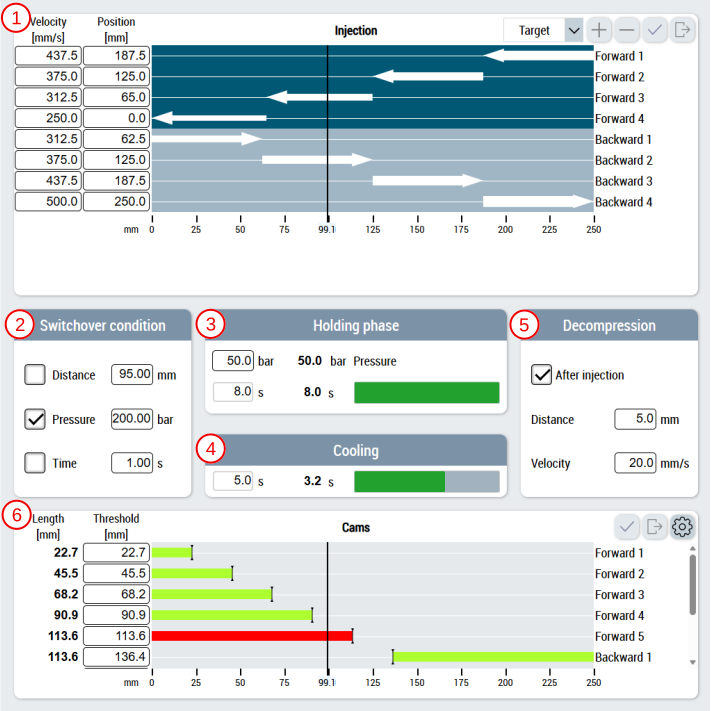
The main page of the injection axis contains the following components:
- Area for setting and representing the motion sequence in segments using the ArrowMotionGraph control
- Setting the values for the switch condition,
- Setting and displaying the pressure and time of the holding pressure phase
- Setting and displaying the cooling time
- Setting the values for decompression
- Area for setting and representing the cams using the cam control
Injection_Settings.content
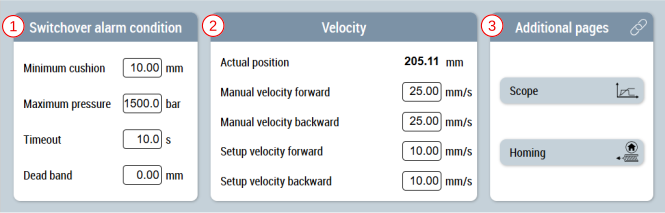
There is a supplementary page for the slider area in addition to the main page of the injection axis.
This page contains the following components:
- Setting the switching limit values
- Setting the velocities
- Area for navigating to other related pages
 | Available since version 12.14.1 |
| Available in the variants (link):
|


