CamControl
NuGet package: Beckhoff.TwinCAT.HMI.Plastic.Controls
Available: since version 12.6.0
CamControl is used to visualize and configure array of cam switches.
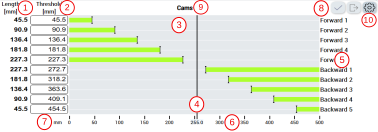
This control visualizes following components:
- Length or hysteresis of each cam depends on type symbols mapped to CamConfig attribute.
- Threshold values for each cam, it defines position of the cam switch on the scale.
- Length and threshold visualization
- Current axis position
- Descriptor text for each cam
- Axis scale
- Scale unit
- Buttons to activate or reset new changes
- Header text
- Button to show cam configuration popup, it is available if symbol mapped to CamConfig attribute is an array of FB_CamSWitchHmi.
 | Activate action Any new changes on the control must be activated using ActivateConfig action to set new values to PLC. |
Further Information