Parameters
The folders named Parameters (Contents/Navigation/Parameters and Contents/Slider/Parameters) contain all contents needed for the configuration of the machine data.
Content | Description | Available in the following variants |
|---|---|---|
The overview page of the machine data. |
| |
Parameters_Accumulator.content | The configuration page of the machine data for the accumulator. |
|
Parameters_Actuators.content | The configuration page of the machine data for the actuators. |
|
The configuration page of the machine data for the blow pin. |
| |
Parameters_Carriage.content | The configuration page of the machine data for the carriage. |
|
Parameters_Clamp.content | The configuration page of the machine data for the clamp. |
|
Parameters_CoExtruder.content | The configuration page of the machine data for the co-extruder. |
|
Parameters_Injector.content | The configuration page of the machine data for the injection unit. |
|
Parameters_MainExtruder.content | The configuration page of the machine data for the main extruder. |
|
Parameters_MeteringScrew.content | The configuration page of the machine data for the metering screw. |
|
Parameters_Monitoring.content | The configuration page of the machine data for the monitoring values. |
|
Parameters_Pwtc.content | The configuration page of the machine data for the PWTC. |
|
Parameters_Setpoints.content | The configuration page of the machine data for the setpoints. |
|
The configuration page of the machine data for the temperature zones and the temperature supply. |
| |
Parameters_Wtc.content | The configuration page of the machine data for the WTC. |
|
Parameters_Settings.content | Displayed in the slider area under the 4th tab when one of the configuration pages is in the main area. |
|


A configuration page is built using the Table control. The control offers the possibility to create various variables in different data types with units and to distribute them to different subpages. With the help of the FillParamTable function from the Beckhoff.TwinCAT.HMI.Plastic.Functions NuGet package, the table control can be automatically filled with the appropriate values based on the parameters passed. Changes in the PLC are automatically applied to the table. Additional rows can be added by adjusting the FirstTable attribute of the table control.
Parameters_Settings.content
The content specially made for the slider area serves as a supplement. It can be selected via the 4th tab of the slider area when the main area displays one of the configuration pages. Included is information about the saved file and functions for loading and saving this data. The displayed texts and functions of the buttons are automatically adapted depending on the displayed configuration page in the main area of the user interface using the function UpdateParametersSettingsControlsEx from the Beckhoff.TwinCAT.HMI.Plastic.Functions NuGet package. To do this, the corresponding symbols are set in the NavigationConfig property of the Configurator control under the slider symbols for each table or sub-table. You can also choose whether the tables in the main area should represent the parameters as one page with a scrollbar or as several pages with a predefined number of parameters per page.
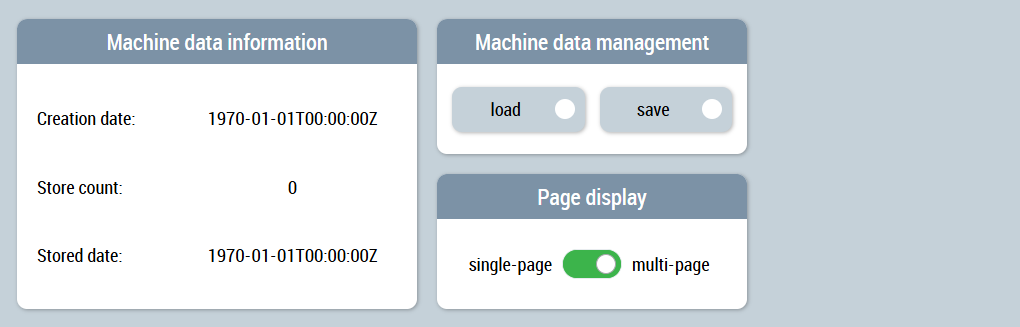
 | Available from version 12.6.0 |
| Available in the variants (link):
|