Version 1.14
The individual installation steps vary depending on the operating system.
Check the required server version
To check which server version is required on the target system, proceed as follows.
- 1. Open your TwinCAT HMI project
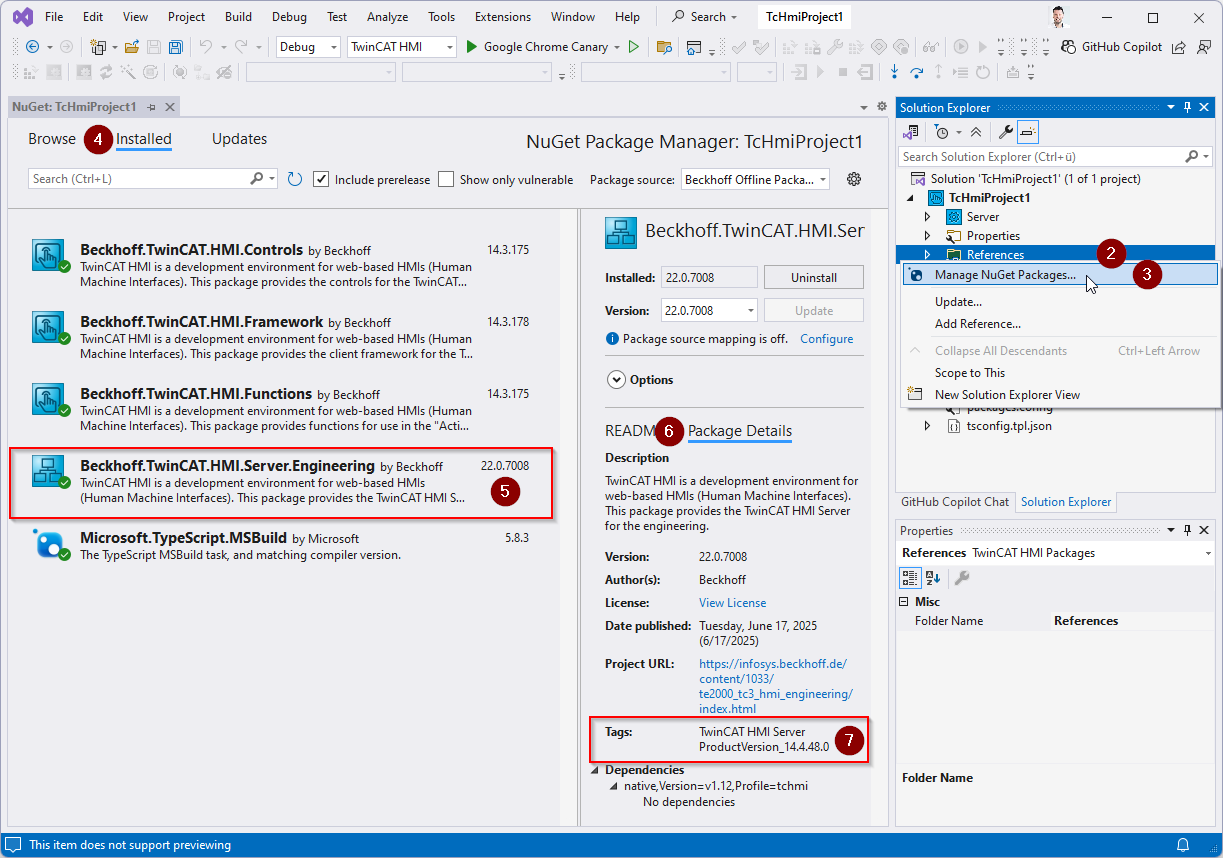
- 2. Select References in the Solution Explorer and right-click to open a context menu.
- 3. Select Manage NuGet Packages from the context menu.
- 4. Go to the Installed tab.
- 5. Select the Beckhoff.TwinCAT.HMI.Server:Engineering package.
- 6. Go to the Package Details tab.
- Under Tags, you can now see the Product Version. This must be identical to the server on the target system.
 | Since version 1.14.x, no HMI server is installed in the background when installing the Engineering (TE2000). The HMI server is integrated directly into the TwinCAT HMI project using a NuGet package. This offers the advantage that there is no fixed binding between the engineering and the version of the server. This allows old projects to be opened in a new engineering without having to migrate to a new version. To update the server version in a project, the NuGet package Beckhoff.TwinCAT.HMI.Server.Engineering must be changed to the desired version. |