FB_SMIDiagAll
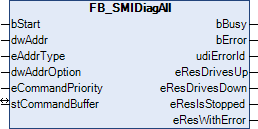
The function block FB_SMIDiagAll can be used to determine in which direction the drives are moving, whether they are stopped or whether there is a motor error. The command can also be sent also to several SMI slaves. The states of all SMI slaves can thus be queried with a single command.
The result of the query is forwarded by four outputs. Each of these outputs can assume three states:
- The condition applies to at least one drive.
- The condition does not apply to any drive.
- The condition could not be determined.
Some examples of this are explained further below.
 Inputs
VAR_INPUT
  bStart           : BOOL;
  dwAddr           : DWORD := 0;
  eAddrType        : E_SMIAddrType := eSMIAddrTypeAddress;
  dwAddrOption     : DWORD := 0;
  eCommandPriority : E_SMICommandPriority := eSMICommandPriorityMiddle;
END_VAR
Name | Type | Description |
|---|---|---|
bStart | BOOL | The function block is activated and the command is sent by applying a positive edge to this input. |
dwAddr | DWORD | Manufacturer code (0-15), address of a device (0-15), bit field (16 bits) for group addressing or slave ID (32-bit key ID). This input has no meaning if a broadcast is sent. |
eAddrType | Specifies whether the input dwAddr is to be evaluated as manufacturer code, address of a device or for group addressing. Addressing via slave ID (eAddrType = eSMIAddrTypeSlaveId) is not permitted. | |
dwAddrOption | DWORD | Reserved for future extensions |
eCommandPriority | Priority (high, medium or low) with which the command is processed by the PLC library. |
 Inputs/outputs
VAR_IN_OUT
  stCommandBuffer : ST_SMICommandBuffer;
END_VAR
Name | Type | Description |
|---|---|---|
stCommandBuffer | Reference to the structure for communication (buffer) with the function block FB_KL6831KL6841Communication() |
 Outputs
VAR_OUTPUT
  bBusy          : BOOL;
  bError         : BOOL;
  udiErrorId     : UDINT;
  eResDrivesUp   : E_SMIDiagResDrivesUp;
  eResDrivesDown : E_SMIDiagResDrivesDown;
  eResIsStopped  : E_SMIDiagResIsStopped;
  eResWithError  : E_SMIDiagResWithError;
END_VAR
Name | Type | Description |
|---|---|---|
bBusy | BOOL | This output is set as soon as the function block processes a command and remains active until the command has been processed. For some errors (e.g. faulty parameters), bError is set immediately after the positive edge at bStart without bBusy switching to TRUE. |
bError | BOOL | This output is switched to TRUE as soon as an error occurs during the execution of a command. The command-specific error code is contained in udiErrorId. The output is reset to FALSE by the reactivation of the function block via the input bStart. |
udiErrorId | UDINT | Contains the command-specific error code of the most recently executed command. It is reset to 0 by the reactivation of the function block via the input bStart (see error codes). |
eResDrivesUp | At least one motor is driving up / no motor is driving up / the value is undefined | |
eResDrivesDown | At least one motor is driving down. / no motor is driving down. / the value is undefined. | |
eResIsStopped | At least one motor is stopped. / no motor is stopped. / the value is undefined. | |
eResWithError | At least one motor is faulty. / no motor is faulty. / the value is undefined. |
Examples
All drives have stopped:
|
Outputs |
Meaning |
|---|---|
|
eResDrivesUp = eSMIDiagResNoMotorDrivesUp |
No drive is driving up |
|
eResDrivesDown = eSMIDiagResNoMotorDrivesDown |
No drive is driving down |
|
eResIsStopped = eSMIDiagResAtLeastOneMotorIsStopped |
At least one drive is stopped |
|
eResWithError = eSMIDiagResNoMotorWithError |
No drive has a motor error |
All drives are driving up:
|
Outputs |
Meaning |
|---|---|
|
eResDrivesUp = eSMIDiagResAtLeastOneMotorDrivesUp |
At least one drive is driving up |
|
eResDrivesDown = eSMIDiagResNoMotorDrivesDown |
No drive is driving down |
|
eResIsStopped = eSMIDiagResNoMotorIsStopped |
No drive is stopped |
|
eResWithError = eSMIDiagResNoMotorWithError |
No drive has a motor error |
One drive is stopped and one drive is driving up:
|
Outputs |
Meaning |
|---|---|
|
eResDrivesUp = eSMIDiagResAtLeastOneMotorDrivesUp |
At least one drive is driving up |
|
eResDrivesDown = eSMIDiagResNoMotorDrivesDown |
No drive is driving down |
|
eResIsStopped = eSMIDiagResAtLeastOneMotorIsStopped |
At least one drive is stopped |
|
eResWithError = eSMIDiagResNoMotorWithError |
No drive has a motor error |
One drive is stopped, one drive is driving up and one drive is driving down:
|
Outputs |
Meaning |
|---|---|
|
eResDrivesUp = eSMIDiagResAtLeastOneMotorDrivesUp |
At least one drive is driving up |
|
eResDrivesDown = eSMIDiagResAtLeastOneMotorDrivesDown |
At least one drive is driving down |
|
eResIsStopped = eSMIDiagResAtLeastOneMotorIsStopped |
At least one drive is stopped |
|
eResWithError = eSMIDiagResNoMotorWithError |
No drive has a motor error |
Requirements
Development Environment | PLC library to include |
|---|---|
TwinCAT from v3.1.4020.14 | Tc2_SMI from 3.3.5.0 |