Operation modes
In EL5101 “Normal operation mode” the following modes are available:
Mode | DC | Main PDO | Comment | Optional PDO 1 | Comment | Features CoE | Comment |
|---|---|---|---|---|---|---|---|
1 | FreeRun | 16 bit Value/Latch Byte alignment | Frequency: 32-bit CoE object 0x8001:02: window | Register reload + Reload value | |||
2 | " | " | " | " | " | Index reset | |
3 | " | " | " | " | " | FWD Cnt + pos/neg gate | |
4 | FreeRun | 16 bit Value/Latch Word alignment | Frequency: 32-bit CoE object 0x8001:02: window | Register reload + Reload value | |||
5 | " | " | " | " | " | Index reset | |
6 | " | " | " | " | " | FWD Cnt + pos/neg gate |
Settings other than those listed above may result in irregular process data and error messages in the TwinCAT System Manager logger window.
 | EL5101 parameterization
|
 in the System Manager)
DC (Distributed Clocks)
Describes whether the terminal is operated with distributed clocks support:
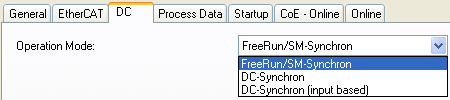 Fig.33: “DC” tab
 | Distributed Clocks in normal operating mode In normal operating mode no DC functions are available. |