Metering
Metering.content
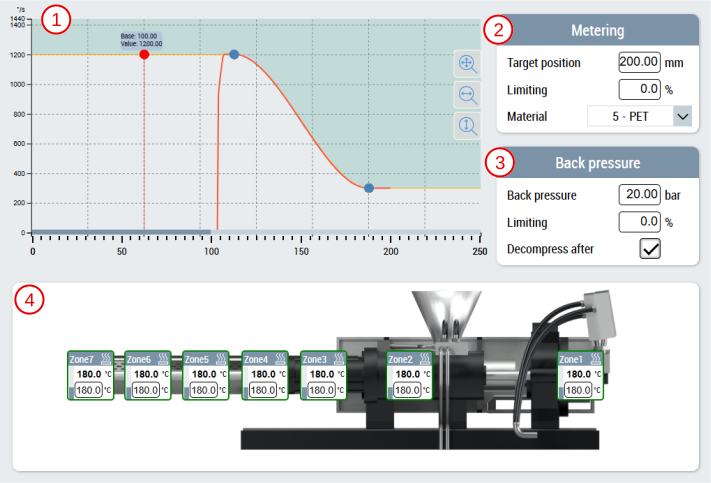
The main metering content consists of the following components:
- Velocity profile of the metering screw using the CurveEditor control
- Range for setting the values for metering
- Range for setting the values for the back pressure
- Representation of the metering screw with the associated temperature zones for displaying the actual values and setting option for the setpoints using the ZoneImageLayout control (is configured via the Layout page of the temperatures)
Metering_Settings.content
In addition to the main metering page there is a supplementary page for the slider area. This content is split into two pages.
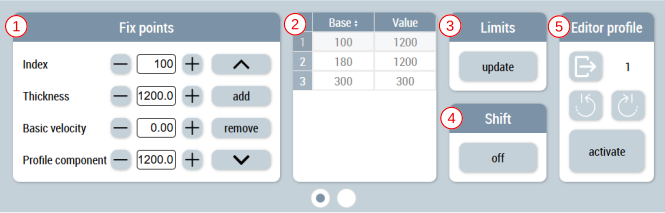
The first page contains the following components:
- Setting the index, thickness, basic thickness and profile component as well as adding, removing and navigating between the existing fix points
- Table for displaying the fix points
- Update option for curve limits
- Switching the shift function on and off
- Undo changes, navigate between activated profiles and activation of the displayed profile
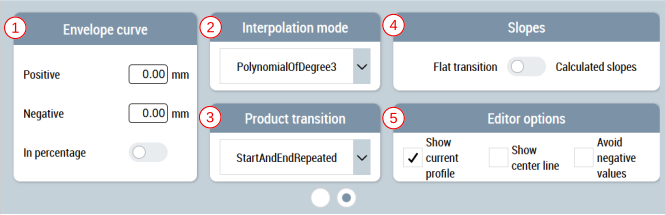
The second page contains the following components:
- Adjustment of the envelope in negative and positive direction and switching in percent
- Setting or displaying the interpolation mode
- Setting or displaying the product transition
- Adjustment of the slopes
- Adjustment of the editor options
 | Available since version 12.14.1 |
| Available in the variants (link):
|


