Histogram resource
The attributes explained on this page can be found in the Common category.
Image resource
The image resource defines the image from which the histogram data is calculated. The intended use is to bind the DisplayedImage attribute of an ImageWatch control as an image resource or to link a ITcVnDisplayableImage symbol from the PLC using the HMI.Vision extension. In general, however, the image resource only needs to be a valid image URL. This can be either a direct path in the project, a URL to an external server, or a Data URL. This works analogously to the Src attribute of the standard image control.
The image resource is specified using the Image attribute:
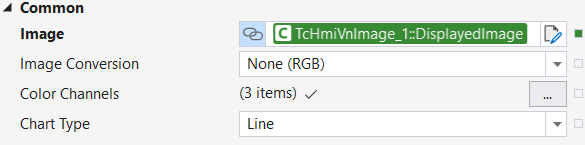
To synchronize the histogram with the displayed image of an ImageWatch control, for example, the DisplayedImage property of the ImageWatch control can be bound directly to the Image property via databinding, as shown in the screenshot.
 | Image size limitation The memory and computing resources required depend on the image size, as well as the hardware and browser being used. With large images, this can affect the display's response time. In these cases, it is recommended that you reduce the image size. |
Color format conversion
Normally, the three channels of the incoming image are interpreted as RGB values and used unchanged to generate the histogram data. However, if the histogram is to be calculated from a different color format, there are two ways to achieve this.
Firstly, the ImageConversion attribute can be used to set a color format into which the image is converted before the histogram is generated. Possible color formats are: None(RGB), Gray, HSV, HSV FULL, HLS, HLS FULL, Lab, YUV, and YCrCb. With the default value None(RGB), the image is not converted. The set color format can influence the display colors of the color channels in the histogram. Further information on this can be found on the Histogram view page.
Alternatively, the image can also be converted in advance using the F_VN_ConvertColorSpace function in the PLC and transferred to the histogram control as a false color image. In this case, ImageConversion should be left at None(RGB) and the labels and colors can be adjusted manually via ColorChannels from the Common category.
| Restriction of ImageConversion The incoming image is always interpreted as RGB when using |
Calculated histogram
The values of the calculated histogram are fully accessible as a two-dimensional array via the Histogram attribute. The first dimension of the array corresponds to the color channels; the second dimension corresponds to the color values. For example, the indices [1][120] can be used to query how many pixels have the color value 120 in the second color channel.
Receive event
Each time the control receives a new image, the onImageReceived event is triggered.