F_VN_OCRExp
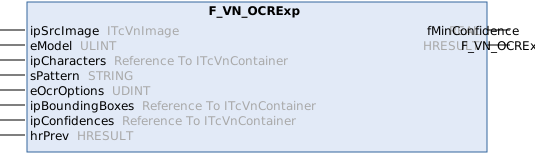
Detects and recognizes characters in a binary image (white characters on black background). (expert function)
Can use available TwinCAT Job Tasks for executing parallel code regions.
Syntax
Definition:
FUNCTION F_VN_OCRExp : HRESULT
VAR_INPUT
ipSrcImage : ITcVnImage;
eModel : ULINT;
ipCharacters : Reference To ITcVnContainer;
sPattern : STRING;
eOcrOptions : UDINT;
ipBoundingBoxes : Reference To ITcVnContainer;
ipConfidences : Reference To ITcVnContainer;
hrPrev : HRESULT;
END_VAR
VAR_OUTPUT
fMinConfidence : REAL;
END_VAR Inputs
Name | Type | Description |
|---|---|---|
ipSrcImage | Source image (USINT elements, 1 or 3 channels). The required number of channels depends on the selected model type. | |
eModel | ULINT | Selection of OCR model types (ETcVnOcrModelType) |
ipCharacters | Reference To ITcVnContainer | Returns the recognized characters (ContainerType_Vector_String_SINT) |
sPattern | STRING | String pattern containing the format in which characters are presented. Pattern handling support depends on the selected model type. |
eOcrOptions | UDINT | Specifies which options must be applied to the function (ETcVnOcrOptions) |
ipBoundingBoxes | Reference To ITcVnContainer | Returns the corresponding bounding boxes of the recognized characters (ContainerType_Vector_TcVnRectangle_DINT, optional, set to 0 if not required). Returns an empty container when bounding boxes are not supported by the selected model type. |
ipConfidences | Reference To ITcVnContainer | Returns the corresponding classification confidences of the recognized characters (ContainerType_Vector_REAL, optional, set to 0 if not required). When the novelty detector is selected, the confidence value is a combination of the classification confidence and the novelty detection confidence. If a character is identified as unknown, the total confidence equals the novelty detection confidence. |
hrPrev | HRESULT indicating the result of previous operations (If SUCCEEDED(hrPrev) equals false, no operation is executed.) |
 Outputs
Name | Type | Description |
|---|---|---|
fMinConfidence | REAL | Returns the minimum value of the confidences across all recognized characters. Characters rejected by the novelty detector are excluded from this minimum. Always computed, even if ipConfidences is not requested. |
Further information
The function F_VN_OCRExp is the Expert version of F_VN_OCR. It contains additional parameters.
Parameter
Input image
The format of the input image that must be provided to ipSrcImage depends on the model used:
- For models whose names begin with
TCVN_OMT_, you must provide a 1-channel binary image that permits only white characters on a black background. - For the model that begins with
TCVN_OMT_CNN_, a 1-channel or 3-channel image of type USINT (8 bits) must be passed, which is automatically converted internally. The specific input format and size of the model are listed in the description of ETcVnOcrModelType. In order to reduce the internal conversion steps and thus also the computing time required, it is recommended to transfer the image with the same number of channels if it already exists in the form before the call. In general, it should be ensured that the aspect ratio of the input image is as similar as possible to that of the model. Otherwise, the internal scaling may result in distortions that impair the detection quality.
Model
The model types of ETcVnOcrModelType that are to be used to classify the characters in a function call must be transferred to eModel. To be able to use several models with one function call, a string pattern must be specified via sPattern. Models that begin with TCVN_OMT_ can be chained with a OR; however, mixing classic and CNN machine learning models is not supported.
To be able to use the individual models, they must first be initialized with the function block FB_VN_InitializeFunction.
Recognized characters
The recognized characters are returned via the reference ipCharacters. Characters classified as unknown by an optional novelty detector are marked with “¤” (ASCII code 164, 0xA4) in the returned string.
String pattern
A string pattern with the expected format of the character string to be recognized can be transferred via sPattern.
Supported formatting and its meaning:
!(exclamation mark) to ignore characters (does not apply to spaces).(period) for any character (excluding spaces)
The use of the period is supported only with the TCVN_OMT_NUMBERS_SC_UCLETTERS model; otherwise, the period behaves like an exclamation point, and S_FALSE is returned._(underscore) for a space (independent ofeOcrOptions)d(number) for an expected number of0-9#(special character) for an expected special character, supported are. / - : = +u(capital letter) for an expected capital letter in the rangeA-Z
If an optional novelty detector is used and it detects an unknown character, an S_FALSE is always returned.
The TCVN_OMT_CNN_NUMBERS_SC_LETTERS model does not support the use of sPattern.
Options
With eOcrOptions, options (ETcVnOcrOptions) can be specified that influence the functionality and result output. The options can be combined to a OR. However, only one option may be selected per functional group, such as the novelty level. If no options are required, a 0 or TCVN_OO_NONE must be passed.
TCVN_OO_WITHBLANKS:ipCharactersin the result. By default, the result does not contain any spaces.TCVN_OO_NOVELTY_LEVEL1:TCVN_OO_NOVELTY_LEVEL2:TCVN_OO_NOVELTY_LEVEL3:
The Novelty Detector option is supported only by models whose names begin with TCVN_OMT_.
Bounding Boxes
The reference ipBoundingBoxes can optionally be used to return the corresponding bounding boxes of the recognized characters. If no bounding boxes are required, the value 0 can be transferred.
The TCVN_OMT_CNN_NUMBERS_SC_LETTERS model does not support the use of ipBoundingBoxes.
Confidences
The reference ipConfidences can optionally be used to return the corresponding classification confidences of the recognized characters. If the option to mark unknown characters is selected, the confidence value is composed of the classification confidence and the confidence of the novelty detector. If a character is classified as unknown, the confidence level corresponds to that of the novelty detector. If no confidences are required, the value 0 can be transferred.
Minimum confidence
The optional return value fMinConfidence returns the minimum confidence value of all characters found.
Application
For example, a call to the OCRExp function, with two models for recognizing numbers and capital letters, with subsequent string export looks like this:
sPattern := 'dd!uuu!dddd'; // e.g. 02-FEB-2024

hr := F_VN_OCRExp(
    ipSrcImage      := ipBinaryImage,
    eModel          := TCVN_OMT_NUMBERS OR TCVN_OMT_UCLETTERS,
    ipCharacters    := ipCharactersResults,
    sPattern        := sPattern,
    eOcrOptions     := eOcrOptions,
    ipBoundingBoxes := ipBoundingBoxes,
    ipConfidences   := ipConfidences,
    hrPrev          := hr,
    fMinConfidence  => fMinConfidence);

// Export character to string
hr := F_VN_ExportSubContainer_String(ipCharactersResults, 0, sText, 255, hr);

// Get the bounding box of the first element
hr := F_VN_GetAt_TcVnRectangle_DINT(ipBoundingBoxes, stRectangle, 0, hr);

// Get the Confidence value of the first element
hr := F_VN_GetAt_REAL(ipConfidences, fConfidence, 0, hr);
To evaluate the confidence values or to draw bounding boxes, individual elements of the containers can be accessed via GetAt. However, if you want to access several or all elements of a container, it is advisable to program a loop or export the ipConfidences container completely as an array.
Examples:
Required License
TC3 Vision OCR
System Requirements
Development environment | Target platform | PLC libraries to include |
|---|---|---|
TwinCAT V3.1.4024.59 or later | PC or CX (x64) with min. PL50, e.g. Intel 4-core Atom CPU | Tc3_Vision |