OCR
This sample shows how characters such as dates and batch numbers on product packaging can be recognized using the OCR (Optical Character Recognition) functionality. The code illustrates the application of the F_VN_OCR standard function as well as the F_VN_OCRExp extended function, including the required pre- and post-processing.
Explanation
These functions enable the recognition of alphanumerical characters. Depending on the model, classification is based on classical or convolutional neural network (CNN) machine learning models with varying functionality and supported character sets.
The classic models, which begin with TCVN_OMT_, require a binary image (white characters on a black background) as input and optionally include a novelty detector.
The CNN-based model, which begins with TCVN_OMT_CNN_, can process 1- or 3-channel USINT-type images as input and offers an expanded character set. This model, however, does not support the use of sPattern, ipBoundingBoxes, or the novelty detector option.
- The ETcVnOcrModelType enum can be used to access various models:
TCVN_OMT_NUMBERS: NumbersTCVN_OMT_NUMBERS_SC: Numbers + special charactersTCVN_OMT_UCLETTERS: Capital lettersTCVN_OMT_NUMBERS_SC_UCLETTERS: Combined character setTCVN_OMT_CNN_NUMBERS_SC_LETTERS: Combined character set, CNN-based- The
F_VN_OCRExpfunction offers extended options: sPatternfor defined format and character specifications (e.g., “uudd” for “AB12”)eOcrOptionsadditional ETcVnOcrOptions that influence the functionality and result outputipBoundingBoxesfor the return of bounding boxes for the recognized charactersipConfidencesfor the confidence values per character
The complete description, the requirements and restrictions as well as further information can be found in the chapter OCR and under the respective functions.
Model initialization
For OCR recognition, the underlying character recognition model must be initialized before the first use. This is done via the FB_VN_InitializeFunction function block, whereby the function to be initialized must first be specified at eFunction. The models to be used later when calling up the OCR function call are specified with nOptions. Several models can be initialized simultaneously with one function call.
F_VN_CheckFunctionInitialization can then be used to check whether the respective model has been initialized correctly. If the model is to be changed at runtime or is no longer required, the model can be deinitialized with F_VN_DeinitializeFunction in order to release the memory again.
Variables
bInitialized    : BOOL := FALSE;
fbInit          : FB_VN_InitializeFunction;
nReturnCode     : UDINT;
Code
IF NOT bInitialized THEN
    fbInit(
        eFunction := TCVN_IF_OCR,
        nOptions  := ETcVnOcrModelType.TCVN_OMT_NUMBERS_SC OR ETcVnOcrModelType.TCVN_OMT_UCLETTERS,
        bStart    := TRUE);

    IF NOT fbInit.bBusy THEN
        fbInit(bStart := FALSE);
        IF NOT fbInit.bError THEN
            bInitialized := TRUE;
            nReturnCode := fbInit.nErrorId AND 16#FFF;
        ELSE
            nReturnCode := fbInit.nErrorId AND 16#FFF;
        END_IF
    END_IF
END_IF
Preprocessing
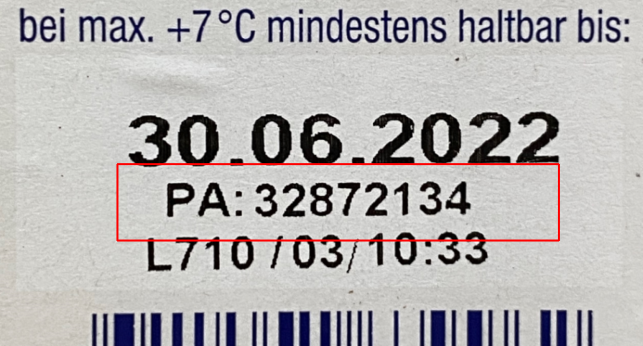
Some pre-processing steps are necessary or useful for using the OCR functions. First, an ROI must be defined that contains only the characters to be recognized in a line and an interference-free zone around the characters.
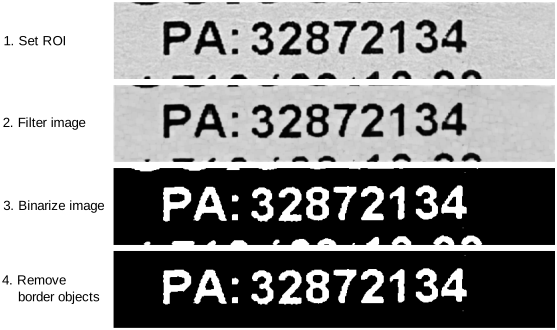
For the classic models, which begin with TCVN_OMT_, this image region must be converted into a 1-channel binary image containing only the white characters to be recognized on a black background. In this example, the F_VN_Threshold is used, which is applied normally or inverted depending on the background and the character color.
For the CNN-based model that starts with TCVN_OMT_CNN_, you must also define an ROI that contains only a single-line string. All other preprocessing steps, filters, or image enhancements are optional, but can help improve the recognition rate and robustness.
As images of different products with different scenarios are used in the sample project, some parameters such as stRoi and fThreshold were stored individually for each test image within the F_GetROI function and retrieved using the image name. In practice, the different parameter values are usually handled via a recipe in the user interface. The following image, in which the specified ROI is shown in red, is used to further describe the example application.
In addition to the necessary pre-processing, as shown in the example, filter operations for noise suppression and morphological operations such as opening or closing can be used to remove small disturbances and to smooth or complete character shapes. Contrast enhancement functions are also frequently used. The choice of suitable filter functions and parameters depends heavily on the specific properties of the image material, so other functions, e.g., from ImageColorAndContrastProcessing, ImageFiltering, or ImageSegmentation, can also contribute to the improvement.
Another helpful step can be the removal of border objects with the F_VN_BrightBorderObjects and F_VN_SubtractImages functions. This eliminates distracting objects at the edge of the image region. These often occur when the ROI definition is imprecise, such as when parts of adjacent characters or lines are inadvertently included in the section, especially if the distances between them are quite small.
The following pre-processing steps are carried out in the sample project:
Code
// Set ROI
hr := F_VN_SetRoi_TcVnRectangle_UDINT(stRoi, ipBinaryImage, hr);

// Filter image
hr := F_VN_CreateStructuringElement(ipStructElem, ETcVnStructuringElementShape.TCVN_SES_RECTANGLE, 3,3, hr);
hr := F_VN_MorphologicalOperator(ipBinaryImage, ipBinaryImage, ETcvnMorphologicalOperator.TCVN_MO_OPENING, ipStructElem, hr);

// Binarize image depending on bright or dark text color
IF bInvertImage THEN
    hr := F_VN_Threshold(ipBinaryImage, ipBinaryImage, fThreshold, 255, TCVN_TT_BINARY_INV, hr);
ELSE
    hr := F_VN_Threshold(ipBinaryImage, ipBinaryImage, fThreshold, 255, TCVN_TT_BINARY, hr);
END_IF

// Remove border objects
hr := F_VN_BrightBorderObjects(ipBinaryImage, ipThreshBorder, hr);
hr := F_VN_SubtractImages(ipBinaryImage, ipThreshBorder, ipBinaryImage, hr);
OCR application
After successful pre-processing, the OCR function can be used. In the sample project, the bUseExpFunction parameter can be used to switch between the standard and the expert version. The following description refers to the use of the expert version and the additional options.
The sPattern parameter is used to specify the character format to be recognized. This option is particularly useful if the sequence and type of characters to be recognized are known in advance. You can then specify which character is expected for each position in the character string. This gives the function the information about which recognition model should be used for each character, which can lead to better results. The specific models contain fewer characters, which reduces the risk of confusion. Furthermore, the function directly returns S_FALSE if the recognized characters do not match specified pattern.
For the image shown, the pattern “uu#dddddddd” is used to recognize the character string. This means that the TCVN_OMT_UCLETTERS model is used for the first 2 characters to identify capital letters. The function then uses the model TCVN_OMT_NUMBERS_SC for the following nine characters, whereby a special character is expected in the first position and a digit in each of the remaining 8 positions.
The TCVN_OMT_CNN_NUMBERS_SC_LETTERS model does not support the use of sPattern.
With eOcrOptions, options (ETcVnOcrOptions) can be specified that influence the functionality and result output. Any spaces found can be included in the output using ipCharacters, since spaces are omitted from the result by default.
In addition, for models whose names begin with TCVN_OMT_, you can enable a novelty detector to filter out unknown characters. Depending on the selected sensitivity (level), more or fewer unknown characters will be recognized; however, valid characters may also be rejected. This option is recommended when disturbances within characters or character overlaps may occur, as these can otherwise lead to incorrect classifications.
Code
hrOCR := F_VN_OCRExp(
            ipSrcImage      := ipBinaryImage,
            eModel          := ETcVnOcrModelType.TCVN_OMT_NUMBERS_SC or ETcVnOcrModelType.TCVN_OMT_UCLETTERS,
            ipCharacters    := ipOCRResult,
            sPattern        := sPattern,
            eOcrOptions     := eOcrOptions,
            ipBoundingBoxes := ipBoundingBoxes,
            ipConfidences   := ipConfidences,
            hrPrev          := hr,
            fMinConfidence  => fMinConfidence);

// Check if characters were found
hr := F_VN_GetNumberOfElements(ipOCRResult, nNumberOfElements, hrOCR);
IF SUCCEEDED(hr) AND nNumberOfElements > 0 THEN
    // Export character to string
    hr := F_VN_ExportSubContainer_String(ipOCRResult, 0, sText, 255, hr);
    // Write text result to image
    hr := F_VN_PutText(sText, ipOriginalImage, stRoi.nX + 5, stRoi.nY + 25, TCVN_FT_HERSHEY_DUPLEX, 1, aGreenColor, hr);
    // Further processing …
END_IF
OCR result evaluation
After calling the OCR function, the HRESULT return value should first be evaluated and checked to see whether or how many characters were recognized. If S_OK is returned, the standard function has recognized characters, with the expert version it depends on whether a sPattern pattern specification has been passed. If a pattern has been specified, S_OK is returned only if the recognized characters match it. Otherwise, S_False is returned and you can examine the recognized characters yourself.
If characters are recognized, they can be exported to a string and, for example, drawn into an image for visual feedback. If the optional novelty detector identifies an unknown character, that character is marked in the returned string with the character “¤” (ASCII code 164 or 0xA4). Since “¤” is not part of the standard 7-bit ASCII character set and is not supported by is text rendering in the image, it is displayed as a question mark (?) in the image.
Furthermore, the number of characters, the entire string or individual characters can be compared with stored expected values. As these assessments are very individual and can be implemented with standard PLC functions, they are not used in this example.
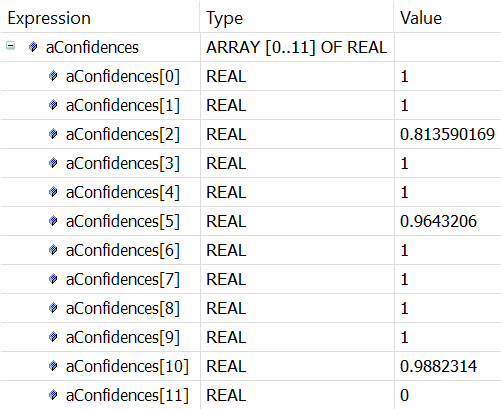
When using the expert version, the individual classification confidences of the recognized characters can be exported, viewed, and used as acceptance criteria for a more detailed analysis.
To identify the boundaries, overlaps, or possibly misrecognized characters, the bounding boxes of the individual recognized characters can be retrieved, evaluated, and drawn in an image. When calculating and drawing, the previously set ROI may need to be taken into account. The TCVN_OMT_CNN_NUMBERS_SC_LETTERS model does not support the use of ipBoundingBoxes.
Code
// Get number of Confidence elements and export them if array is large enough
hr := F_VN_GetNumberOfElements(ipConfidences, nNumberOfElements, hr);

// Check if number of elements fits to array size
IF nNumberOfElements > 0 AND nNumberOfElements <= 12 THEN
    hr := F_VN_ExportContainer(ipConfidences, ADR(aConfidences), SIZEOF(aConfidences), hr);
END_IF

// Get bounding box rectangle and draw it to filtered and original image
hr := F_VN_GetNumberOfElements(ipBoundingBoxes, nNumberOfElements, hr);
IF nNumberOfElements > 0 THEN
    FOR nIterator := 0 TO nNumberOfElements -1 DO
        hr := F_VN_GetAt_TcVnRectangle_DINT(ipBoundingBoxes, stRectangle, nIterator, hr);
        hr := F_VN_DrawRectangle_TcVnRectangle_DINT(stRectangle, ipBinaryImage, aWhiteColor, 1, hr);
        // Add ROI Offset
        stRectangle.nX := stRectangle.nX + UDINT_TO_DINT(stRoi.nX);
        stRectangle.nY := stRectangle.nY + UDINT_TO_DINT(stRoi.nY);
        hr := F_VN_DrawRectangle_TcVnRectangle_DINT(stRectangle, ipOriginalImage, aBlueColor, 1, hr);
    END_FOR
END_IF
Presentation of results
The following image shows the result display of the expert function. The recognized characters are shown in green and the optional bounding boxes in blue.
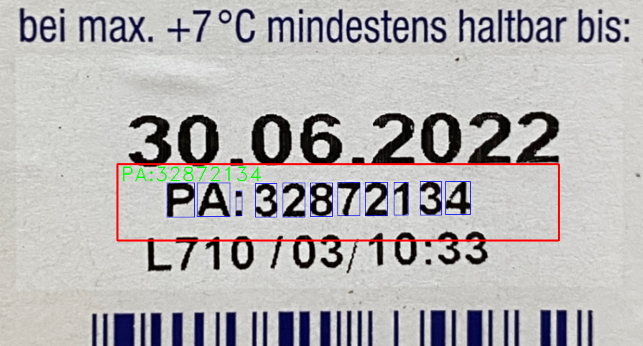
The confidence values for each recognized character are available for further evaluation in the aConfidences array.