MC_CamAdd
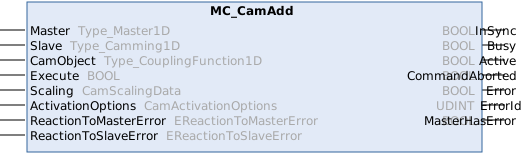
This function block adds a cam table coupling on a slave.
Generated setpoints from single cam table couplings are internally added.
As MC_CamIn, this function block can also be used to initiate camming-based synchronization.
As this function block is used for multi-camming, some special rules apply:
The same master can be used in multiple cam table couplings. A cam table can only be used once in a slave.
Syntax
Definition:
FUNCTION_BLOCK MC_CamAdd
VAR_INPUT
    Master                : Type_Master1D;
    Slave                 : Type_Camming1D;
    CamObject             : Type_CouplingFunction1D;
    Execute               : BOOL;
    Scaling               : CamScalingData;
    ActivationOptions     : CamActivationOptions;
    ReactionToMasterError : EReactionToMasterError;
    ReactionToSlaveError  : EReactionToSlaveError;
END_VAR
VAR_OUTPUT
    InSync                : BOOL;
    Busy                  : BOOL;
    Active                : BOOL;
    CommandAborted        : BOOL;
    Error                 : BOOL;
    ErrorId               : UDINT;
    MasterHasError        : BOOL;
END_VAR
 Inputs
|
Name |
Type |
Default |
Description |
|---|---|---|---|
|
Master |
|
Reference to the master axis | |
|
Slave |
|
Reference to the slave axis | |
|
CamObject |
|
Reference to the cam object | |
|
Execute |
BOOL |
|
Start cam add at rising edge. |
|
Scaling |
|
Scaling of the new coupling | |
|
ActivationOptions |
|
Options controlling how the cam coupling is activated (mode, position, reference object). | |
|
ReactionToMasterError |
TriggerSlaveError |
Reaction if an error occurs in the master while this command is active. | |
|
ReactionToSlaveError |
TriggerMasterError |
Reaction if an error occurs in the slave while this command is active. |
 Outputs
|
Name |
Type |
Description |
|---|---|---|
|
InSync |
BOOL |
Synchronization succeeded |
|
Busy |
BOOL |
Function block is not finished and new output values are to be expected. |
|
Active |
BOOL |
Function block has active control on the axis. |
|
CommandAborted |
BOOL |
Command is aborted by another command. |
|
Error |
BOOL |
Error occurred within function block. |
|
ErrorId |
UDINT |
Error identifier |
|
MasterHasError |
BOOL |
Master is in error state. |
Further information:
The same rules apply to ActivationOptions.ReferenceObject as to MC_CamIn. ActivationOptions.ReferenceObject:
- ReferenceObject is not required when curve synchronization is initiated (the master curve table coupling of this function block is used for activation).
- By default, the slave’s active master curve table coupling is used, provided that only one exists (ReferenceObject = 0). If there are multiple slaves, set ReferenceObject = CamObject to ensure proper synchronization.
- ReferenceObject must not be 0 if there is more than one active master curve table coupling.
MC_CamAdd allows you to program cam plate couplings for a slave axis to multiple different master axes. It should be noted that a master axis can be used in multiple cam plate couplings, i.e., for multiple slave axes. An MC_CamObject can be used only once for the same slave axis.
Possible error codes
For this function block, the following values, among others, are possible for the ErrorId output:
Error(Hex) | Error(Dec) | Error type | Description |
|---|---|---|---|
0x8145 | 33093 | Function Block | Mapping of cyclic interface between NC and PLC is missing (e.g., AXIS_REF, AXES_GROUP_REF, ...). A reference used by the function block (e.g., to an axis, group, mover or other motion object) is not linked to the corresponding NC object, or its cyclic mapping is incomplete. |
0x8169 | 33129 | Function Block | Master axis does not exist or cannot be used. The axis passed as master does not exist or has no cyclic mapping and therefore cannot be used as master (e.g., for camming or gearing). |
0x81af | 33199 | Function Block | Invalid object or object reference passed to function block. An invalid or missing object reference was passed to the function block (e.g., missing CamObject reference on MC_CamIn, MC_CamTableSelect or MC_CamScaling). |
0x81b0 | 33200 | Function Block | Object not allowed (e.g., object is already in use). The supplied object is not allowed in the current context (e.g., source and target are identical in CopyFrom(), the object is already used by another axis). |
0x81b1 | 33201 | Function Block | Invalid size passed to function block (e.g., invalid array size or invalid number of elements). An invalid size was passed to the function block (e.g., CamRef.NumberOfPoints less than two on MC_CamTableSelect). |
0x81b2 | 33202 | Function Block | The given cam activation settings are invalid. The activation settings of the cam table (e.g., ActivationMode and ActivationPosition) are invalid or inconsistent. |
0x81b3 | 33203 | Function Block | The given cam scaling is invalid. The supplied cam table scaling parameters are invalid (e.g., scale factor of zero, or master offset mode Auto which is not supported in the executed operation). |
0x81b4 | 33204 | Function Block | The given cam data point is invalid. At least one data point of the cam table is invalid (e.g., the first or last point is being ignored). |
0x81c2 | 33218 | State | A queued cam command could not be transitioned from queued to active. An error occurred while transitioning a queued cam command (e.g. MC_CamIn, MC_CamAdd, MC_CamExchange, MC_CamScaling or MC_CamRemove) to the active state. This typically happens when the camming state changed between queuing and activation, for example because the referenced cam table is already coupled or no longer coupled, or because the setpoint or activation time could not be computed. |
An overview of all NC error codes can be found here:
Version information
- TwinCAT Standard >= v3.1.4026.23.1
- TF5550 MC3 Camming >= v4.0.6 (includes TF5500 MC3 Base >= v4.0.6)
Required License
TC3 MC3 Camming