MC_MoveVelocity
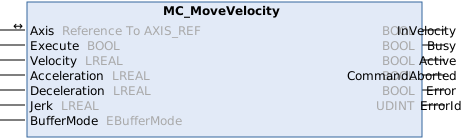
This function block commands an endless movement with a specified velocity.
Syntax
Definition:
FUNCTION_BLOCK MC_MoveVelocity
VAR_IN_OUT
Axis : Reference To AXIS_REF;
END_VAR
VAR_INPUT
Execute : BOOL;
Velocity : LREAL;
Acceleration : LREAL;
Deceleration : LREAL;
Jerk : LREAL;
BufferMode : EBufferMode;
END_VAR
VAR_OUTPUT
InVelocity : BOOL;
Busy : BOOL;
Active : BOOL;
CommandAborted : BOOL;
Error : BOOL;
ErrorId : UDINT;
END_VAR Inputs
Name | Type | Default | Description |
|---|---|---|---|
Execute | BOOL |
| Trigger the command with rising edge. |
Velocity | LREAL | #Invalid | Commanded velocity ([PosUnit]/s, the sign of this parameter determines the direction of movement). |
Acceleration | LREAL | #Default | Maximum acceleration ([PosUnit]/s^2, positive) |
Deceleration | LREAL | #Default | Maximum deceleration ([PosUnit]/s^2, positive) |
Jerk | LREAL | #Default | Maximum jerk ([PosUnit]/s^3, positive) |
BufferMode | EBufferMode | Aborting | Chronological sequence of the command |
 Outputs
|
Name |
Type |
Description |
|---|---|---|
|
InVelocity |
BOOL |
Commanded velocity reached |
|
Busy |
BOOL |
Function block is not finished and new output values are to be expected. |
|
Active |
BOOL |
Function block has active control on the axis. |
|
CommandAborted |
BOOL |
Command is aborted by another command. |
|
Error |
BOOL |
Error occurred within function block. |
|
ErrorId |
UDINT |
Error identifier |
Further information
The function block MC_MoveVelocity is used to start an endless travel with a specified velocity and direction. As soon as the specified constant velocity is reached, the InVelocity output is set, and the function block has completed its operation. The function block does not perform any further monitoring of the motion. If the command is aborted during the acceleration phase, the CommandAborted output or, in the event of an error, the Error output is set.
The motion can be paused using MC_Halt and MC_Stop, or it can be canceled by another motion command.
If a motion command with the input BufferMode = Tc3_Mc3Base.EBufferMode.Aborting is applied to a coupled slave axis, this causes the axis to be automatically decoupled, followed by the execution of the command.
Note on the migration from NC2 to MC3
Unlike the NC2 function block of the same name, the MC3 function block MC_MoveVelocity has a signed Velocity input. The sign indicates the direction of motion.
Version information
- TwinCAT Standard >= v3.1.4026.23.1
- TF5500 MC3 Base >= v4.0.6