MC_Stop
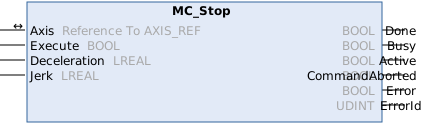
This function block commands a motion stop and transfers the axis to the state Stopping. It aborts any ongoing function block execution. While the axis is in state Stopping, no other function block can perform any motion on the same axis. The Done output is set immediately after zero dynamics is reached. The axis remains in the state Stopping as long as Execute is TRUE or zero dynamics is not yet reached. As soon as Done is SET and Execute is FALSE the axis goes to state Standstill.
Syntax
Definition:
FUNCTION_BLOCK MC_Stop
VAR_IN_OUT
    Axis           : Reference To  AXIS_REF;
END_VAR
VAR_INPUT
    Execute        : BOOL;
    Deceleration   : LREAL;
    Jerk           : LREAL;
END_VAR
VAR_OUTPUT
    Done           : BOOL;
    Busy           : BOOL;
    Active         : BOOL;
    CommandAborted : BOOL;
    Error          : BOOL;
    ErrorId        : UDINT;
END_VAR
 Inputs
|
Name |
Type |
Default |
Description |
|---|---|---|---|
|
Execute |
BOOL |
|
Trigger the command with rising edge. While this is TRUE, other function blocks will be rejected for the axis. |
|
Deceleration |
LREAL |
#Default |
Maximum deceleration ([PosUnit]/s^2, positive) |
|
Jerk |
LREAL |
#Default |
Maximum jerk ([PosUnit]/s^3, positive) |
 Outputs
|
Name |
Type |
Description |
|---|---|---|
|
Done |
BOOL |
Zero dynamics has been reached. |
|
Busy |
BOOL |
Function block is not finished and new output values are to be expected. |
|
Active |
BOOL |
Function block has active control on the axis. |
|
CommandAborted |
BOOL |
Command is aborted by another command. |
|
Error |
BOOL |
Error occurred within function block. |
|
ErrorId |
UDINT |
Error identifier |
Further information
The function block MC_Stop is used to stop an axis with a defined deceleration ramp and to lock the axis against other motion commands. Only when the axis is at a standstill (MC_Stop.Done = TRUE) and the input MC_Stop.Execute = FALSE is the axis unlocked for other motion commands.
For the braking ramp, the maximum values of deceleration and jerk from the previous command and those specified in the function block are used.
Alternatively, an axis can be stopped with MC_Halt without locking.
If MC_Stop is applied to a coupled slave axis, the axis is automatically decoupled, and the stop command is then executed.
Effects on the axis state
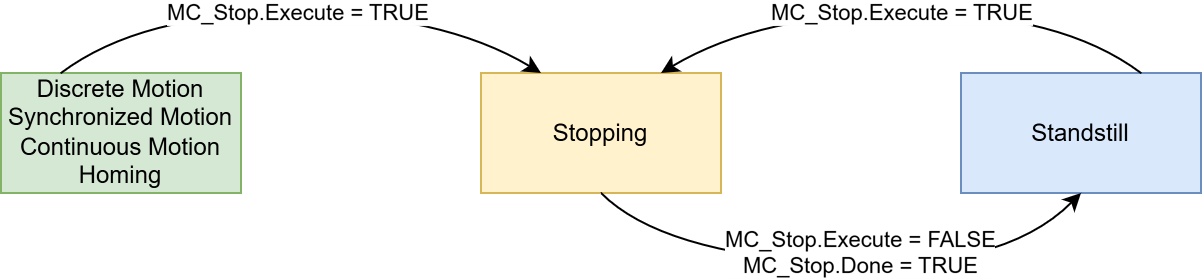
The MC_Stop function block can be called in any motion state of the axis. This sets the axis to the Stopping state. In addition to bringing the axis to a stop using a defined braking ramp, the Stopping state locks the axis against other motion commands. Therefore, it is also possible to call MC_Stop while in the Standstill state to lock the axis. Only when the axis is no longer moving and the input MC_Stop.Execute = FALSE is the axis set to the Standstill state, thereby releasing the axis lock.
Note on the migration from NC2 to MC3
In MC3, the parameterization of the dynamics is not possible with a value of 0 (implicit use of the last commanded dynamics).
Version information
- TwinCAT Standard >= v3.1.4026.23.1
- TF5500 MC3 Base >= v4.0.6