MC_CamAdd
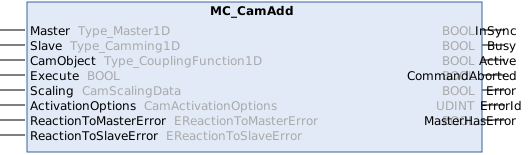
This function block adds a cam table coupling on a slave.
Generated setpoints from single cam table couplings are internally added.
As MC_CamIn, this function block can also be used to initiate camming-based synchronization.
As this function block is used for multi-camming, some special rules apply:
The same master can be used in multiple cam table couplings. A cam table can only be used once in a slave.
Syntax
Definition:
FUNCTION_BLOCK MC_CamAdd
VAR_INPUT
    Master                : Type_Master1D;
    Slave                 : Type_Camming1D;
    CamObject             : Type_CouplingFunction1D;
    Execute               : BOOL;
    Scaling               : CamScalingData;
    ActivationOptions     : CamActivationOptions;
    ReactionToMasterError : EReactionToMasterError;
    ReactionToSlaveError  : EReactionToSlaveError;
END_VAR
VAR_OUTPUT
    InSync                : BOOL;
    Busy                  : BOOL;
    Active                : BOOL;
    CommandAborted        : BOOL;
    Error                 : BOOL;
    ErrorId               : UDINT;
    MasterHasError        : BOOL;
END_VAR
 Inputs
|
Name |
Type |
Default |
Description |
|---|---|---|---|
|
Master |
Type_Master1D |
|
Reference to the master axis |
|
Slave |
Type_Camming1D |
|
Reference to the slave axis |
|
CamObject |
|
Reference to the cam object | |
|
Execute |
BOOL |
|
Start cam add at rising edge. |
|
Scaling |
|
Scaling of the new coupling | |
|
ActivationOptions |
|
Options controlling how the cam coupling is activated (mode, position, reference object). | |
|
ReactionToMasterError |
EReactionToMasterError |
TriggerSlaveError |
Reaction if an error occurs in the master while this command is active. |
|
ReactionToSlaveError |
EReactionToSlaveError |
TriggerMasterError |
Reaction if an error occurs in the slave while this command is active. |
 Outputs
|
Name |
Type |
Description |
|---|---|---|
|
InSync |
BOOL |
Synchronization succeeded |
|
Busy |
BOOL |
Function block is not finished and new output values are to be expected. |
|
Active |
BOOL |
Function block has active control on the axis. |
|
CommandAborted |
BOOL |
Command is aborted by another command. |
|
Error |
BOOL |
Error occurred within function block. |
|
ErrorId |
UDINT |
Error identifier |
|
MasterHasError |
BOOL |
Master is in error state. |
Further information:
The same rules apply to ActivationOptions.ReferenceObject as to MC_CamIn. ActivationOptions.ReferenceObject:
- ReferenceObject is not required when curve synchronization is initiated (the master curve table coupling of this function block is used for activation).
- By default, the slave's active master curve table coupling is used, provided that only one exists (ReferenceObject = 0). If there are multiple slaves, set ReferenceObject = CamObject to ensure proper synchronization.
- ReferenceObject must not be 0 if there is more than one active master curve table coupling.
MC_CamAdd allows you to program cam plate couplings for a slave axis to multiple different master axes. It should be noted that a master axis can be used in multiple cam plate couplings, i.e., for multiple slave axes. An MC_CamObject can be used only once for the same slave axis.
Version information
- TwinCAT Standard >= v3.1.4026.23.1
- TF5550 MC3 Camming >= v4.0.6 (includes TF5500 MC3 Base >= v4.0.6)
Required License
TC3 MC3 Camming