Set the valve output
- An MC3 axis was created and an Analog Drive was configured as the axis type;
see Adding an axis.
- 1. Double-click the FluidPower Axis object.
- 2. Open the Init Parameter tab.
- 3. Set the Maximum Velocity in the Maximum Dynamics group.
The Maximum Velocity is the reference velocity of the position controller. It represents the maximum velocity that the hydraulic cylinder can reach when the valve is 100% open. This value must be calculated taking into account the cylinder dimensions and the valve size.
This is also the velocity limit for profile generation. - 4. Configure the Analog Drive/Scaling group.
In this example, Velocity Scaling Numerator corresponds to the increments of the analog output module, and Velocity Scaling Denominator corresponds to the maximum velocity.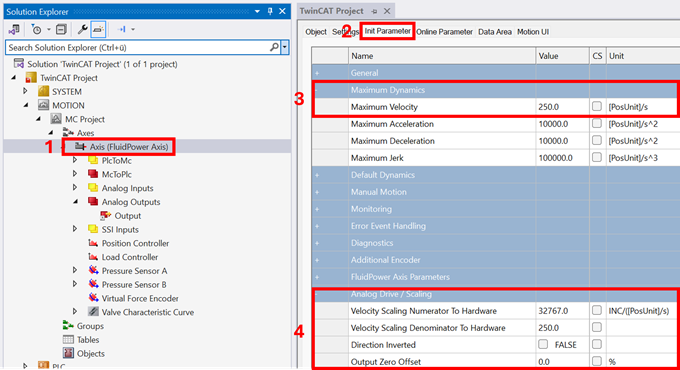
Explanations of the parameters can be found here: Init Parameter
The next step is the parameterization of the pressure sensors;
see Set the pressure sensors.