Set the pressure sensors
- An MC3 FluidPower axis has been created;
see Adding an axis.
- 1. Double-click the Pressure Sensor A/B object.
- 2. Open the Init Parameter tab.
- 3. Set the parameters:
e.g., pressure sensor pA, 400 bar / 32,767-increment analog module.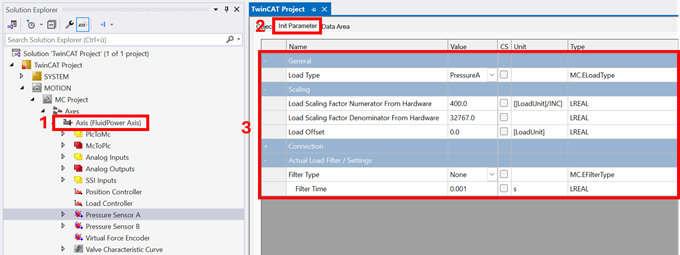
Explanations of the parameters can be found here: Init Parameter - 4. Activate the TwinCAT project.
→ Configure the Load Offset to zero the sensor when the hydraulic system is depressurized.
Once parameterization is complete, move the axis in manual operation to check the direction of rotation;
see Move the axis in manual operation using Motion UI.