Link axis objects to hardware
- An MC3 axis was created, and its axis and encoder types were configured;
see Adding an axis. - A hardware configuration has been created;
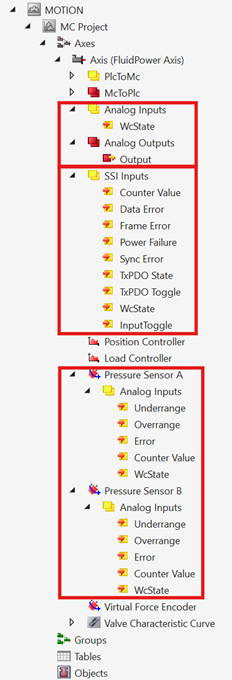
see Adding an I/O Device. - An axis configuration has been created (pressure sensors A/B, axis type: analog drive, encoder type: SSI encoder).
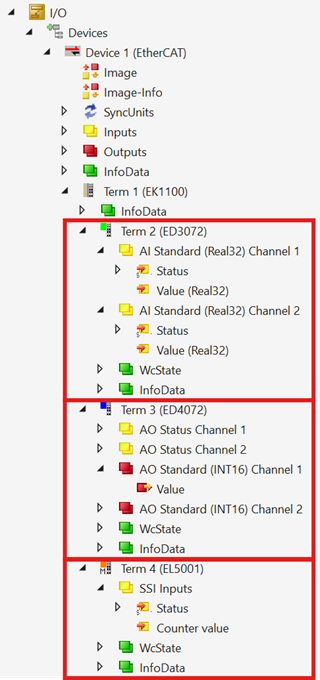
- A hardware configuration has been created (Ain, Aout, and SSI terminals).
- 1. Select the link you want to connect from the axis configuration,
for example, Pressure Sensor A → Counter Value to link the counter input of pressure sensor A. - 2. Right-click on Change Link…
- 3. Select the hardware link you want to connect,
for example, EL3074 → Value to connect analog input 1. - 4. Confirm your selection with OK.
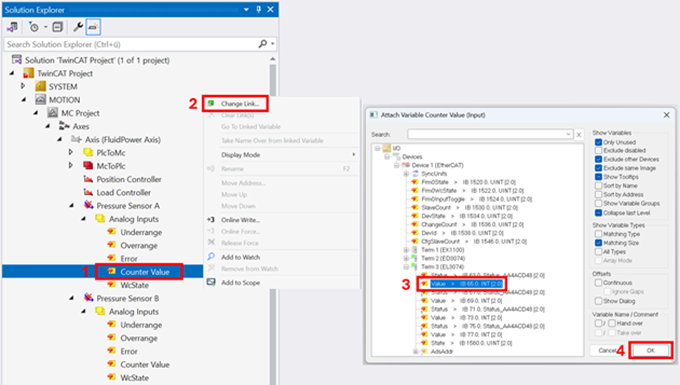
- 5. Repeat the process for all links available in the axis and hardware configuration.
- In the Solution Explorer configuration in the project tree, all variables from the cyclic I/O interface are linked and marked with a white icon.
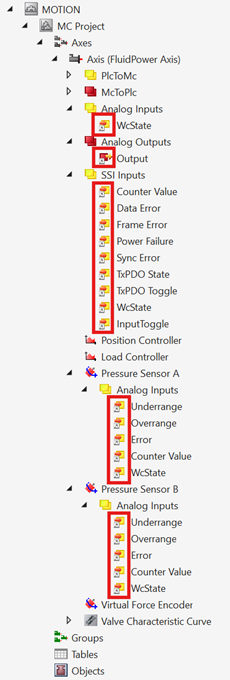
- 6. Activate the TwinCAT project.
The next step is the parameterization of the SSI encoder;
see Set the position measuring system.