Set the position measuring system
- An MC3 axis was created and an SSI encoder was configured;
see Adding an axis.
- 1. Double-click the FluidPower Axis object.
- 2. Open the Init Parameter tab.
- 3. Configure the SSI encoder groupings using the data sheet for the encoder you are using,
e.g., resolution scaling of 0.1 µm.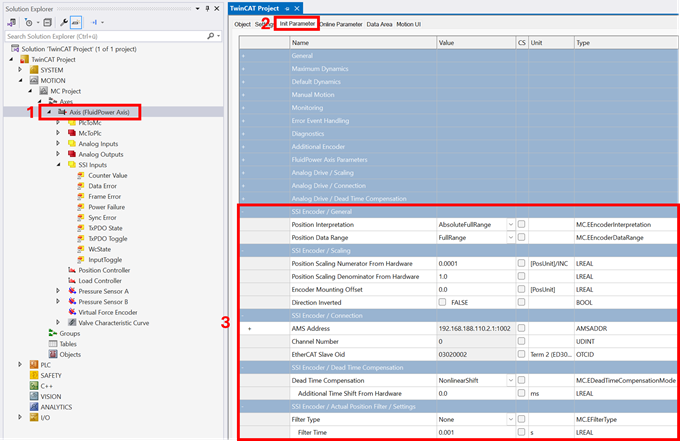
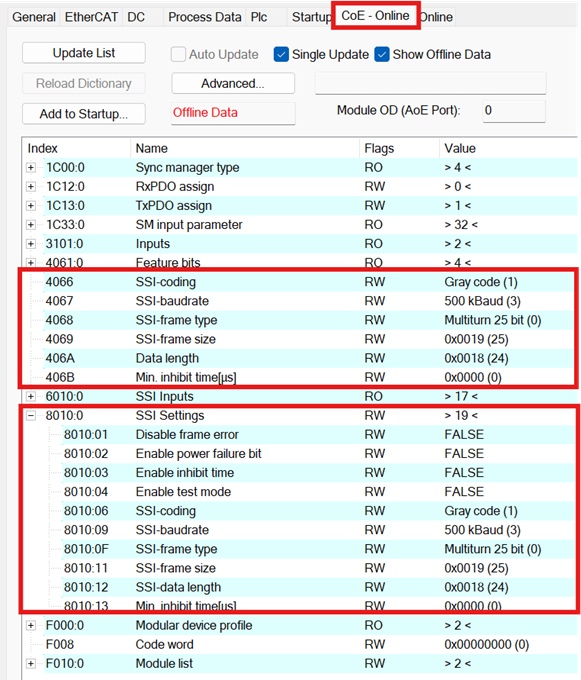
Explanations of the parameters can be found here: Init Parameter - 4. Parameterize the remaining parameters for the SSI encoder in the terminal under CoE – Online; see https://infosys.beckhoff.com/content/1033/el500x/2247264523.html
The next step is the parameterization of the cylinder data;
see Set cylinder data.