Version 3.4.x to 4.0.x: Manual adjustments XAE
This section describes the transition process from version 3.4.67 to version 4.0.6 (or higher).
Starting point
Installed workloads TF5400.AdvancedMotionPack.XAE and TF5400.AdvancedMotionPack.XAR, version 3.4.67 (or earlier).
Preparation (Optional): Uninstall the TF5400.AdvancedMotionPack.XAR workload from the target system if the old configuration is no longer needed on the target system.
 | The TF5400.AdvancedMotionPack.XAE workload should not be uninstalled in order to continue supporting legacy projects and target systems. |
Installation
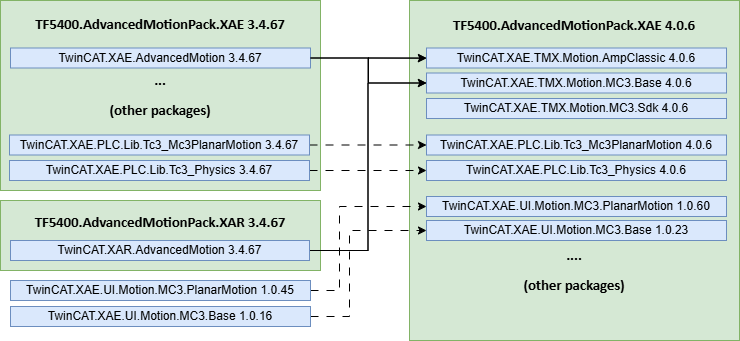
Update the TF5400.AdvancedMotionPack.XAE workload to version 4.0.6. The following image shows the changes to the workloads and packages. Since the workload is not available in version 4.0.6, you must either install the packages shown in the image directly or use a higher version of the workload (e.g., 4.0.12).
|
|
|
| Advanced Motion Pack Workload |
|
|
|
| TcPkg packages |


Project settings in the SYSTEM node
This is where version settings are configured, particularly for existing projects. When inserting new objects into the MOTION node, you can specify the desired version directly.
Set the version for all Planar objects (Mover, Track, Group, Environment) to 4.0.6; see “Version control”, documentation MC3.
Project Settings in the Motion Node
In the MC Project, the new "Scheduling" setting in the Context tab must be set to "Fast Reaction" instead of "Stable"; otherwise, an error message regarding the Planar objects will appear at startup, see “Scheduling”.
- 1. Select the MOTION > MC Project node ( 1).
- 2. Go to the Context tab ( 2).
- All contexts and objects of the MC Project are listed there.
- 3. In the Scheduling column, set the value for the context of the Planar objects toFast Response (3).

Mover Object Settings in the Motion Node
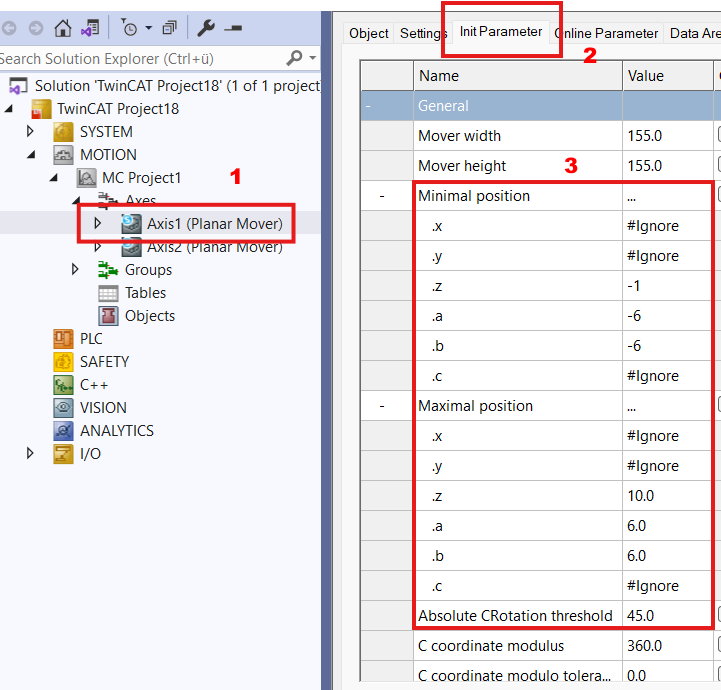
- In the mover objects, the new parameters “Minimum/Maximum Position” and “Absolute CRotation threshold” must be checked. These must be compatible with the hardware being used and the desired application; see mover/Configuration/InitParameter, starting with version V4.0.6.
- 4. Select the node MOTION > MC Project1 > Axes > Axis1 (Planar mover) (1).
- 5. Go to the Init Parameter tab ( 2).
- All of the Planar Mover's initialization parameters are listed there.
- 6. For the new parameters, enter the values appropriate for the Planar mover in the Value column (3).