Context tab
In TwinCAT MC3, the execution of the axes can be assigned to different task contexts. Contexts make it possible to distribute axis execution across multiple CPU cores and to specify different cycle times for different axes, even on a single core. In the MC project, you can configure the settings on the Context tab.
A task context always consists of three tasks:
- MET – Motion Execution Task
- MPT – Motion Preparation Task
- Job Task
The MET and MPT tasks of a context must always be assigned to the same core, and both tasks may only be used in one context. Conversely, a job task may be assigned to multiple contexts.
Task cycle times are configured via the respective task object under SYSTEM > Tasks. CPU core allocation is configured under SYSTEM > Real-Time.
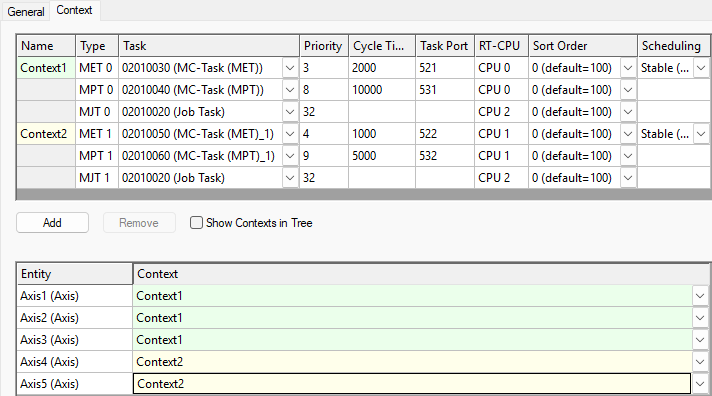
Alternatively, the task context for an axis can be configured on the axis's Settings tab.
Scheduling
An MC3 axis is a TcCOM object. The basics of TcCOM real-time module execution are explained in the “Basics” documentation at the end of the Real-Time > Differences in execution between PLC and TcCOM runtime modules chapter. Based on this, the following configuration options can be used to influence the internal execution sequence of command processing and setpoint generation.
Stable (Output – Commands – Exec)
This setting corresponds to “IO at the start of the task”. Command processing and setpoint generation are performed during the “post-cycle update” and therefore after the “output Update”. Select this setting to reduce jitter in the “output update”. Calculated setpoints are written to the output process image in the next cycle.
Fast Reaction (Commands - Exec - Output)
With this setting, the commands and setpoints are processed or calculated during the “cycle update” between the “input update” and the “output update”. Please note that the “Output Update” option has higher jitter than the “Stable” option. Calculated setpoints are written to the output process image immediately after their generation (in the same cycle).
 | Scheduling when using the SAF NC task Please note that this setting has no effect on instances that use the NC SAF task. In this case, Fast Reaction (Commands – Exec – Output) is used regardless of the parameter settings. |