Window Properties
The following settings are available on the project node of the TwinCAT 3 PLC Profiler. The properties listed in the Profiler area always apply to all sub-elements. These properties therefore apply to the entire PLC project at project level.
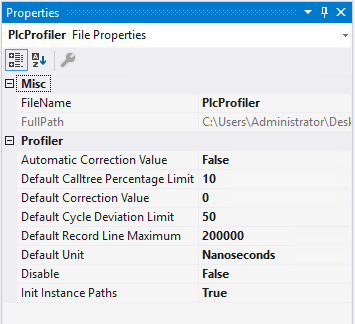
Property | Meaning |
|---|---|
Profiler | |
Automatic Correction Value | Activates the automatic correction calculation of the runtime component of the profiler measurement marks. The correction value is calculated per cycle from the measurement data and subtracted from the displayed execution times (Own Time). Prerequisite: The Add Measure Method option must be activated in the profiler configuration (see Window Configuration). If automatic correction is deactivated, the default value from Default Correction Value is used instead. |
Default Calltree Percentage Limit | Threshold value for the Hotpath analysis in percent. If the percentage of Own Time of an element exceeds the total execution time of a cycle, this is displayed as an element with high time consumption in the Hotpath analysis area. |
Default Correction Value | Default correction value in [ns], which is used when Automatic Correction Value is deactivated. The value is then subtracted equally from the measured values for all cycles. |
Default Cycle Deviation Limit | Threshold value for the cyclic deviation, evaluation in percent. If the percentage of Own Time of an element in the total execution time of a cycle exceeds this value, this element is displayed as having a cyclic deviation in the Hotpath analysis. |
Default Record Line Maximum | Maximum number of entries for the Record file. If this value is reached, a new file is automatically created. |
Default Unit | The default time unit for opening a report (ms/µs/ns). |
Disable | Disable the Profiler. |
Init Instance Paths | Enable instance path generation. The function is required to display the exact instance path of each call in the report. Generation can be disabled, as this prolongs the compile process. |