Window Configuration
In the configuration window, you can customize the profiler's measurement configuration.
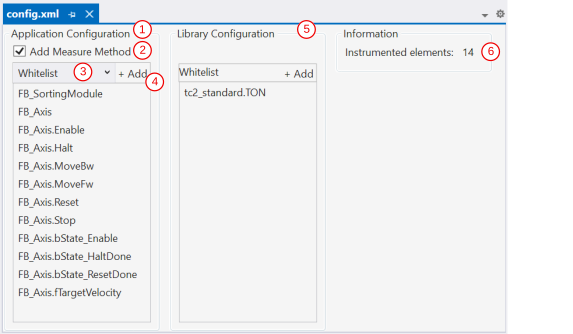
No. | Property | Meaning |
|---|---|---|
1 | Application configuration list | List that serves as the basis for the configuration. |
2 | Add Measure Method | Activates an additional measurement mark at the beginning of the task cycle that measures the runtime overhead of the profiler measurement marks themselves. The measurement results are used for the automatic correction calculation (see the Automatic Correction Value property). Without the Measure Method, the Profiler does not generate any measurement data for automatic correction. |
3 | Blacklist and whitelist | The drop-down menu is used to select whether the configuration of the POUs to be measured is created on the basis of a blacklist or whitelist. |
4 | Add button | The button can be used to add program elements to the configuration lists. The available elements are displayed and can be chosen via the Input Assistant. Alternatively, elements can be dragged and dropped from the project tree (Solution Explorer) into the application configuration list (also with multiple selection). |
5 | Library configuration list | Library function blocks can be added to the configuration in a second whitelist. Library function blocks are added via the Input Assistant or via drag and drop from the Library Manager. |
6 | Instrumented Elements | Number of program elements whose runtime is to be measured. |
Configuration types
When creating a new configuration, the following options are available for the application:
Option | Description |
|---|---|
Active Blacklist (Instrument all) | All elements are instrumented. Individual elements can be excluded via the blacklist. |
Active whitelist (block all) | All elements are blocked. Only elements on the whitelist are instrumented. |
Active Whitelist with Task Program | All elements are blocked. Task programs and elements on the whitelist are instrumented. |
Only a whitelist is offered for libraries, as a blacklist would include too many elements for recording. This would lead to a high resource consumption.
Configurable element types
The following PLC element types can be added to the configuration list via Add:
Element type | Description |
|---|---|
PROGRAM | All programs of the PLC application |
FUNCTION_BLOCK | All function blocks of the PLC application |
METHOD | All methods of function blocks |
ACTION | All actions of programs or function blocks |
The Input Assistant can be used to search for specific POUs. Individual POUs or entire element types can be added to the blacklist or whitelist.