Dialog Options - Write Options
Write Options
Separate Line IDs |
|
Sort by name |
|
Write Line IDs | Available from TC3.1 Build 4026
This setting is the global default setting for writing line IDs. When a new PLC project is created, the value of this setting is transferred to the local project setting once. This can be found in the PLC project properties (Category Advanced) and can be adapted there for each project. |
Write PLC Bookmarks to File | Available from TC3.1 Build 4026
This setting is the global default setting for writing bookmarks. When a new PLC project is created, the value of this setting is transferred to the local project setting once. This can be found in the PLC project properties (Category Advanced) and can be adapted there for each project. |
Sample
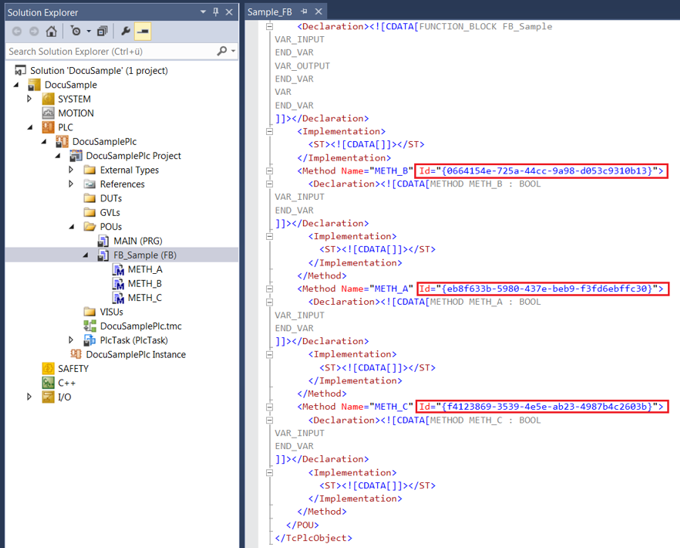
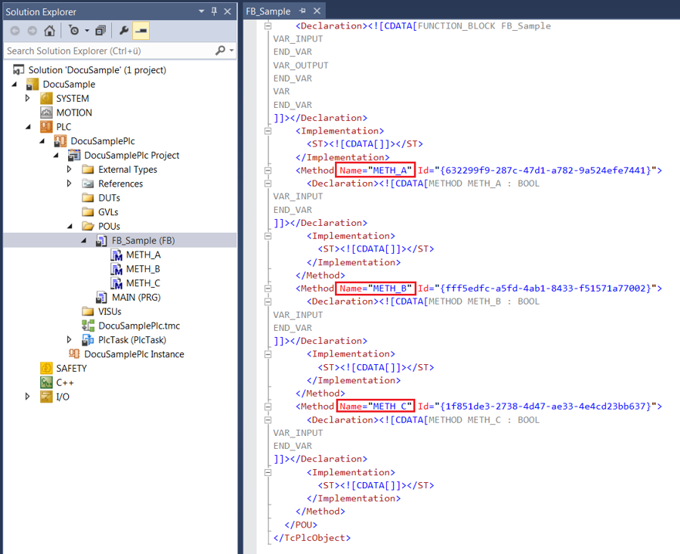
The sample illustrates the different storage sequence of the METH_A, METH_B and METH_C methods, depending on whether the Sort by name option is enabled or disabled. If the option is disabled (FALSE), the METH_B method is not in second place according to its name, but in first place according to its internal ID.
Sort by name = TRUE:
Sort by name = FALSE: