Operate tab
The set of elements on the Operate tab depends on the MTP type of the symbol bound to the Data Symbol property.
The Operate tab of the ready-to-use faceplate has repeating groups of elements for different MTP types. The buttons have an indicator below which shows the corresponding Act or Fbk status (gray = 0, blue = 1).The following table gives a description of the elements.
# | Group of elements (example) | Description |
|---|---|---|
1 |
| Group State (according to the MTP Specification Part 3). See State Modes. The current state of the DataAssembly is OFFLINE. Button Operator is shown as enabled for pushing, other buttons are disabled. The reason for this is that, according to the MTP Specification Part 3, possible transitions are: Offline → Operator Operator → Offline Operator → Automatic Automatic → Operator |
2 |
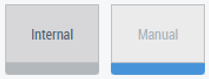
| Group Source (according to the MTP Specification Part 3). See Source Modes. The current source of the DataAssembly is MANUAL. The button Internal is enabled for pushing. The button Manual is disabled because the current source is MANUAL. |
3 |
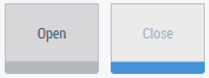
| Open/Close Switching group (can be switch ON / switch OFF, etc.). The current state is CLOSED. The button Open is enabled for pushing. The button Close is disabled because the valve is already closed. Whether the group is active or not depends on the current state of the State group (#1 in this table): If the State group isn’t present: always active. If the State group is present: active only when the state is OPERATOR. |
4 |
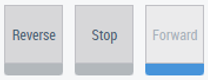
| Reverse/Stop/Forward Switching group. The current state is FORWARD. Forward button is disabled, Stop and Reverse buttons are enabled for pushing. Depending on FwdEn/RevEn, the corresponding buttons can be hidden. The group is only active when the current state of the State group (#1 in this table) is OPERATOR. |
5 |
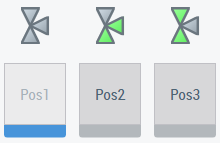
| Pos1/Pos2/Pos3 Switching group for TriPos Valves. Graphical elements on top show the parts which should be active for every position. The current state is POSITION 1. Button Pos1 is disabled, buttons Pos2 and Pos3 are enabled for pushing. The group is active only when the current state of the State group (#1 in this table) is OPERATOR. |
6 |
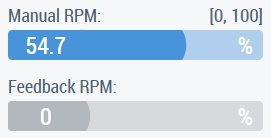
| Value group consists of a control which allows a value to be set manually and a control which gives feedback on the actual current value. The name, scale, and engineering units of the value can be different. Whether the group is allowed to set the value or not depends on the current state of the Source group (#2 in this table): If the Source group isn’t present: always allowed. If the Source group is present: active only when the state is MANUAL. If the Source group state is INTERNAL, setting value control just shows the value which is given internally. |
7 |
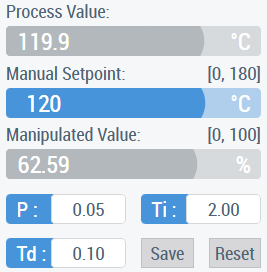
| PID Controller group consists of such elements:
Behavior of the Setpoint depending on the states of the State and Source groups is described in a table.
Behavior of the Manipulated Value depending on the states of the State and Source groups is described in a table.
|
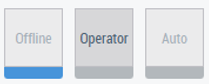
The following table shows the description of PID Controller group elements’ behavior
#1 in the table |
#2 in the table | Setpoint behavior | Manipulated value behavior |
OFFLINE | INTERNAL | Read only | Changeable, without taking effect |
OFFLINE | MANUAL | Changeable, without taking effect | Changeable, without taking effect |
OPERATOR | INTERNAL | Read only | Changeable, takes effect on the Manipulated value |
OPERATOR | MANUAL | Changeable, without taking effect | Changeable, takes effect on the Manipulated value |
AUTOMATIC | INTERNAL | Read only, takes effect on the Manipulated value | Read only, calculated based on Setpoint |
AUTOMATIC | MANUAL | Changeable, takes effect on the Manipulated value | Read only, calculated based on Setpoint |
Reusing the Operate tab with the Tabs property
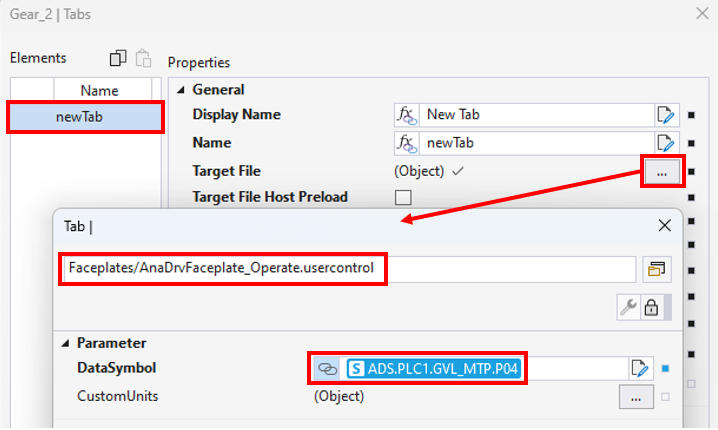
Operate ready-to-use faceplates can be reused in the Tabs property without any changes if they work with a FB instance which has the same set of variables (same names and same types) as that defined for the DataSymbol parameter of the faceplate. Below is an example of the settings for the AnaDrv MTP type DataSymbol parameter for AnaDrvFaceplate_Operate.usercontrol: