Category: Label
An example of the control labels is shown below.
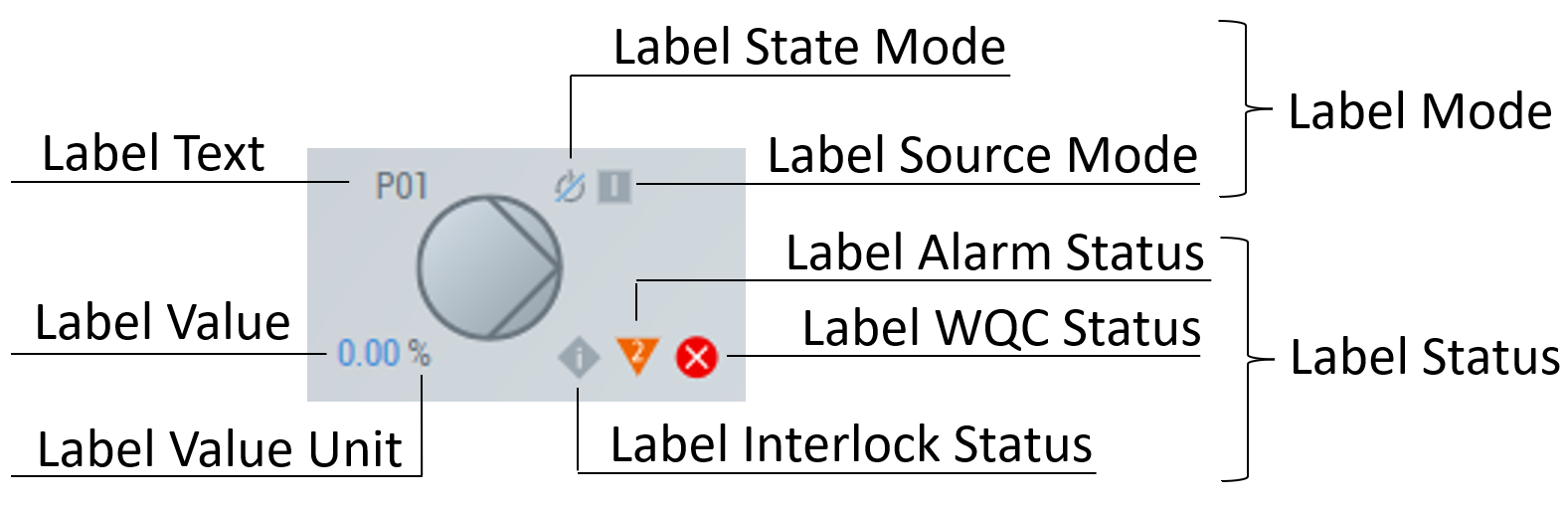
The following table shows the Label category properties
Property | Description |
|---|---|
Show Label Text | Enable/disable label text (1 – enable; 0 – disable). |
Label Text | Defines an optional label text instead of the one taken from the Data Symbol property. |
Label Text Horizontal Alignment | Defines the horizontal alignment of the label text. |
Label Text Vertical Alignment | Defines the vertical alignment of the label text. |
Show Label Value | Enable/disable label value (1 – enable; 0 – disable). |
Label Value | Defines an optional label value instead of the one taken from the Data Symbol property. |
Label Value Unit | Defines an optional label value unit instead of the one taken from the Data Symbol property. |
Label Value Format | A formatting function to format the label value (no HTML allowed). |
Label Value Unit Format | A formatting function to format the label value unit (no HTML allowed). |
Label Value Horizontal Alignment | Defines the horizontal alignment of the label value. |
Label Value Vertical Alignment | Defines the vertical alignment of the label value. |
Show Label Mode | Enable/disable label mode (1 – enable; 0 – disable). |
Label State Mode | Defines an optional label state mode instead of the one taken from the Data Symbol property. State Modes. |
Label Source Mode | Defines an optional label source mode instead of the one taken from the Data Symbol property. Source Modes. |
Label Mode Horizontal Alignment | Defines the horizontal alignment of the label mode. |
Label Mode Vertical Alignment | Defines the vertical alignment of the label mode. |
Show Label Status | Enable/disable label status (1 – enable; 0 – disable). |
Label Interlock Status | Defines an optional label interlock status for the one taken from the Data Symbol property. Interlock Statuses. |
Label Interlock Message | Message for faceplate footer active lock element. |
Label Alarm Status | Defines an optional label alarm status instead of the one taken from the Data Symbol property. Alarm Statuses. |
Label Alarm Message | Message for faceplate footer status element. |
Label WQC Status | Defines an optional label WQC status instead of the one taken from the Data Symbol property. WQC Statuses. |
Label WQC Message | Message for faceplate footer WQC element. |
Label Status Horizontal Alignment | Defines the horizontal alignment of the label status. |
Label Status Vertical Alignment | Defines the vertical alignment of the label status. |
Label Text Padding | The distance of the label text to the original position. |
Label Value Padding | The distance of the label value to the original position. |
Label Mode Padding | The distance of the label mode to the original position. |
Label Status Padding | The distance of the label status to the original position. |
In addition to label state mode (explanations are given for behavior according to the MTP standard, but a user can change the behavior by implementing custom FB):
Num | Icon | Meaning | Explanation |
|---|---|---|---|
1 |
| Offline | The control is blocked. No switching requests or value transfers are respected. |
2 |
| Operator | Manual control is activated. Manual (operator) switching requests are respected. |
3 |
| Automatic | Automatic control is activated. Internal (automatic) switching requests are respected. |
Other | - | None |
|


In addition to label source mode (explanations are given for behavior according to the MTP standard, but a user can change the behavior by implementing custom FB):
Num | Icon | Meaning | Explanation |
|---|---|---|---|
1 |
| Internal | Control by internal parameters is activated. Internal control requests are made visible externally using automatic indicators. |
2 |
| Manual | Control by parameters being set by an operator is activated. |
Other | - | None |
|


In addition to label interlock status (explanations are given for behavior according to the MTP standard, but a user can change the behavior by implementing custom FB):
Num | Icon | Meaning | Explanation |
|---|---|---|---|
1 |
| Permit | Implements a switch-on lock. This prevents activation of DataAssembly when in the locked state. However, an already activated DataAssembly in the locked state is not set to the safe position. |
2 |
| Interlock | Implements a lock that both prevents switching on and puts a DataAssembly in its safe position. An active interlock does not need to be reset. |
3 |
| Protect | Implements a lock like interlock, but with the difference that the protection must be reset. |
Other | - | None |
|


In addition to label alarm status (explanations are given for behavior according to the MTP standard, but a user can change the behavior by implementing custom FB):
Num | Icon | Meaning | Explanation |
|---|---|---|---|
1 |
| Tolerance | Out of tolerance limit. |
2 |
| Warning | Out of warning limit. |
3 |
| Alarm | Out of alarm limit. |
Other | - | None |
|


In addition to label WQC status (status names are given according to the NAMUR recommendations (NE 184), but a user can change the behavior by implementing custom FB):
Num | Icon | Status |
|---|---|---|
0 |
| Failure |
96 |
| Function Check |
164 |
| Maintenance Request |
104 |
| Out of Specification |
28 |
| Out of Service |
Other | - | None |