Display and diagnostics
LEDs EL3008-0003, EL3008-0005
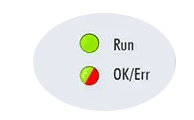
LED | Color | Meaning | |
|---|---|---|---|
RUN | green | These LEDs indicate the terminal’s operating state: | |
off | State of the EtherCAT State Machine: INIT = initialization of the terminal | ||
flashing | State of the EtherCAT State Machine: PREOP = function for mailbox communication enabled and non-default settings configured | ||
Single flash | State of the EtherCAT State Machine: SAFEOP = verification of the Sync Manager channels and the distributed clocks. | ||
on | State of the EtherCAT State Machine: OP = normal operating state; mailbox and process data communication is possible | ||
flickering | State of the EtherCAT State Machine: BOOTSTRAP = function for firmware updates of the terminal | ||
OK | green | No error | |
Err | red | Corresponds to PDO Status.Error: Over/Underrange, etc. | |
Diagnostics via CoE directory and Diag messages
The LED status (0xF915) and device information (0xF900) can be read via the CoE directory (see chapter “Device diagnostic functions”)
Diagnostic messages are displayed in the “Diag History” (see chapter “Diag-Messages”).