Integrating IO-Link devices
The integration of the IODD file should always be the first step, since this enables the breakdown of the individual process data of the IO-Link device as well as the display of the parameters.
There are several ways of integrating an IO-Link device:
- 1. Open the “Device Management” dialog window via the “Device Catalog” button
- 2. Importing the IODD file (offline and online) via
- Import Devicedescription button or
- “Online” tab with the IODD Finder
- 3. Use the “Local” tab to select a device and assign it to a port
- 4. Automatic scanning of the IO-Link ports (online) via
- Scan Devices button
- 5. Manual insertion (offline and online) via
- “Create Device” tab
 | Application note
|
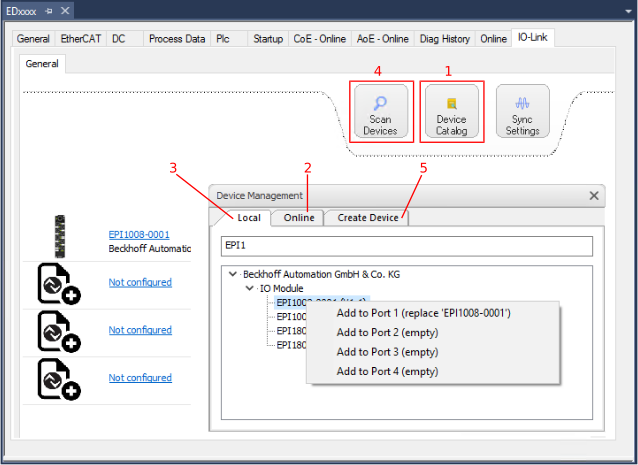 Fig.20: Creating IO-Link devices