1. Importing the device description IODD
Importing the device description simplifies the integration of the IO-Link devices. The individual process data are broken down, enabling simple parameterization of the sensor. The IODD only needs to be imported during the initial commissioning of a new IO-Link device. The import is port-independent. Proceed as follows to import the IODD:
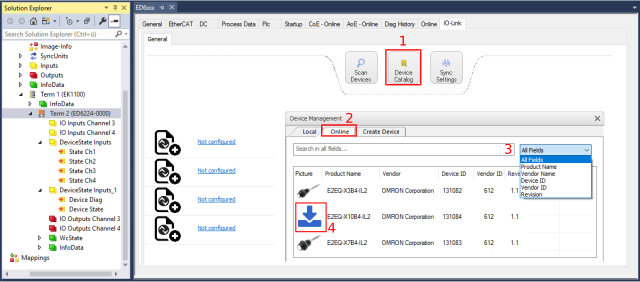 Fig.21: Import of the IODD device description via “IODD Finder”
Integrating the IODD via the “IODD Finder”
- 1. Click on the “Device Catalog” button in the “IO-Link” tab (see figure above (1)).
- The “Device Management” window will open.
- 2. Search for the desired IO-Link sensor/device by choosing the search field and entering the search term in the search mask (see figure above (3)).
- 3. Select the desired IO-Link sensor/device. Move the mouse pointer over the figure of the desired IO-Link sensor/device. A blue download icon appears, see figure above (4).
- 4. After clicking on the download icon, the .xml file of the selected IO-Link sensor/device is imported and stored in the following folder:
- for TwinCAT 2.x: \TwinCAT\IO\IOLink
- for TwinCAT 3.x: \TwinCAT\3.X\Config\IO\IOLink - 5. When moving the mouse pointer over the IO-Link sensor/device, a green icon now indicates (see the following figure) that the .xml file already exists.
- 6. The imported device descriptions are listed in the “Local” tab in the tree structure, sorted by vendor.
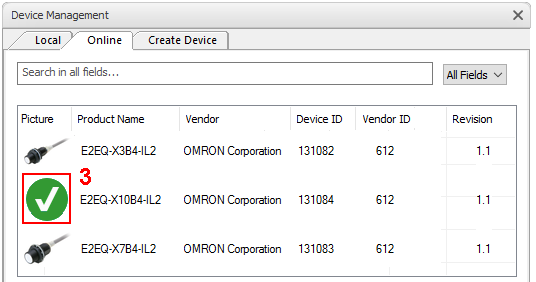 Fig.22: IODD Finder, display of an already imported device description
Button "Import Devicedescription“
- 1. Press the “Import Devicedescription” button in the “IO-Link” tab
- 2. Select the .xml file of the desired sensor.
- 3. After pressing the Open button, the imported files are stored in the following folder:
- for TwinCAT 2.x: \TwinCAT\IO\IOLink
- for TwinCAT 3.x: \TwinCAT\3.X\Config\IO\IOLink.
- The imported device descriptions are listed in a tree structure in the “Catalog” field, sorted by vendor.
 | No manual copying of the XML files Do not copy the files directly into the folder; read them in via Import Devicedescription instead! Important checks will otherwise be bypassed! |