Basic function principles
The following section describes the function and parameterization of the multi-functional analog input for EtherCAT devices in the EL/ED307x series.
The EtherCAT device contains several functions that are controlled
- by enabling/disabling cyclic process data (PDO) at commissioning time in the EtherCAT master
- by setting/changing CoE settings in the device, this can be done during runtime
By default, the input channels are configured as analog inputs with the “AI Standard (Real32)” PDO (16-bit “Status” + 32-bit “Value (Real32)”, see 1 in the figure below).
Alternatively, they can be configured as PDO “AI Standard” with 16-bit “Status” + 16-bit “Value”. Furthermore, the input process image can be displayed in “Compact” mode without status bits.
In addition, optional input and output PDOs can be selected (see 2 and 3 in the figure below).
The input channels are set to Interface ±10 V, Floating Point, Extended Range in the CoE.
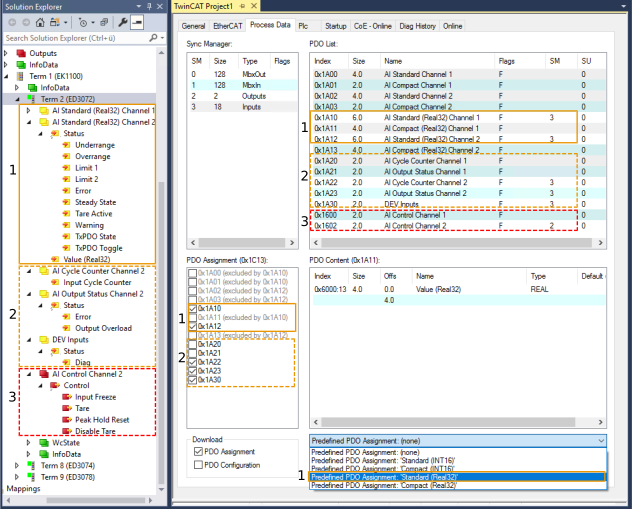
CoE parameterization:
CoE registers are listed below. The “n” in the index represents the channel number of the EtherCAT device:
Channel 1: n = 0, channel 2: n = 1, …
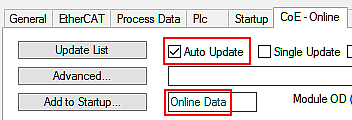
The CoE values cannot be read in real time. They are updated approximately once per second in the online display in TwinCAT. The values can also be retrieved from the controller via ADS or, depending on the type, written to it. Depending on the EtherCAT cycle time, this occurs at an update rate of up to a few milliseconds.
- Before initial commissioning, it may be advisable to reset the CoE parameters of the EtherCAT device using a CoE reset.
- To do this, enter the value specified by the Restore object 0x1011:01. This covers all channels
(See the chapter “Restoring the delivery state” in the EtherCAT system manual.)
“Default” or “default setting” refers to the basic setting ex factory or the setting restored by a CoE reset.
Notice | ||
 | Parameterization via the CoE list (CAN over EtherCAT) The EtherCAT device is parameterized via the CoE - Online tab (with a double click on the respective object) or via the Process Data tab (assignment of PDOs). A detailed description can be found in the EtherCAT System-Documentation in chapter “EtherCAT subscriber configuration” Please note the general CoE notes in the EtherCAT System Documentation in chapter “CoE-interface” when using/manipulating the CoE parameters: | |
Temporal operating behavior of the EtherCAT devices ED307x
The EtherCAT device supports the following EtherCAT operation modes:
- “FreeRun”: yes
- if the filter is enabled;
- regardless of the EtherCAT cycle, the EtherCAT device processes its AI data at the conversion rate specified in the “Filter 1” chapter;
- EtherCAT cycle times supported by the terminal: 100 µs…10 ms
- “SM-Synchron” (frame-triggered): yes
- if the filter is disabled;
- Data processing in the EtherCAT device is triggered by the EtherCAT frame, but not faster than 500 µs;
- EtherCAT cycle times supported by the terminal: 100 µs…10 ms
- Distributed clocks: no