Restoring the delivery state
Some EtherCAT devices (“Slaves”, “SubDevices”) save parameters or data locally in a persistent (non-volatile) manner. To reset them, the CoE object Restore default parameters, subindex 001 can be used via an EtherCAT master (e.g. TwinCAT) (see Fig. Selecting the “Restore default parameters” PDO)
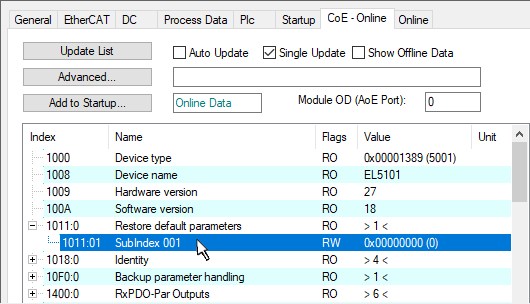 Fig.191: Selecting the Restore default parameters PDO
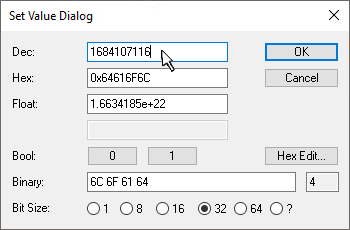 Fig.192: Entering a restore value in the Set Value dialog
Double-click on SubIndex 001 to open the Set Value dialog.
The aim is to reset function-controlling “parameters” (settings, values) that are persistently stored in the device and can be changed by the user to the default state.
Volatile (not power-fail-safe) “parameters” are reset
- by a RePower On/Off
- by an EtherCAT status change through INIT
unless otherwise described in the device documentation. Depending on the device and FW version, one or two reset functions are available; please refer to the respective device documentation for availability.
Notice | |
Changing existing checksums Any existing checksums for the parameter ranges will (of course) change as a result of the reset. |
Reset level 1: Function reset “load”
It is assumed that the function reset is used more often, possibly several times, e.g. during commissioning.
Enter the reset value 1684107116 in the Dec field or alternatively the value 0x64616F6C in the Hex field (ASCII: “load”) and confirm with OK (Fig. Entering the restore value in the Set Value dialog).
- All changeable CoE entries are reset to the default values.
Exception: objects protected by a write protection password - Depending on the size of the object directory, this process can take from a few ms to > 1 second.
- The values can only be successfully restored if the reset is directly applied to the online CoE, i.e. to the slave. No values can be changed in the offline CoE.
- TwinCAT must be in the RUN or CONFIG/Freerun state, i.e. EtherCAT data exchange is taking place. Ensure error-free EtherCAT transmission.
- The reset does not result in a separate confirmation. A changeable object can be modified beforehand for checking purposes.
- This reset procedure can also be included as the first entry in the startup list of the slave, e.g. in the PREOP->SAFEOP state transition or, as in Fig. CoE reset as a startup entry, in SAFEOP->OP.
- In this way, backup objects are reset to the delivery state.
Notice | |
Depending on the device, individual values are not reset Depending on the device, some values are intentionally not reset on “load” if the values are necessary for commissioning or essential device functions, for example, and determining them (after a deletion) would require considerable effort. |
 | Alternative restore value With some older terminals (FW created around 2007 or earlier), the backup objects can be changed with an alternative restore value: Decimal value: 1819238756, Hexadecimal value: 0x6C6F6164. An incorrect entry for the restore value has no effect! |
Reset level 2: Data reset “wipe”
It is assumed that a data reset is rarely used, e.g. when a product is decommissioned.
Enter the reset value 2003398757 in the Dec field or alternatively the value 0x77697065 in the Hex field (ASCII: “wipe”) and confirm with OK (Fig. Entering the restore value in the Set Value dialog).
- The aim of this function is a complete reset (data deletion) to the factory settings so that no user-specific settings can be read afterwards
- It affects the following parameter areas (if available on the device)
- CoE (parameters)
- SoE (parameters)
- FoE (files on the device)
- Register values (if stored persistently)
- User memory such as NOVRAM (if available)
- Additional data areas, if available
- Values/data are deleted even if they are protected, for example with a user-defined write-protection password.
- The following are not reset:
- FW version and EtherCAT revision status; any updates remain installed on the device
- Electrical health data such as Device Statistics (CoE: 0x1020), all types of operating hours counters, possibly histograms or peak values relating to ambient temperature or load conditions, …
- Vendor calibration data protected by the vendor password