MC_ReadCamIn
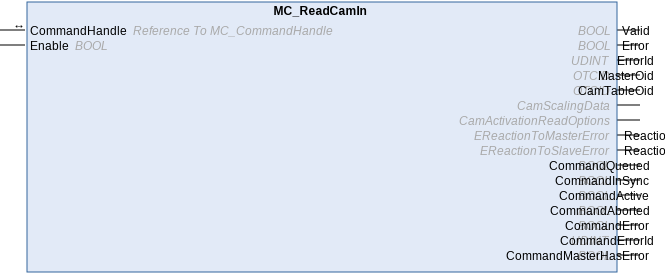
This function block provides a read-only view on the parameters and status of the CamIn command attached to CommandHandle. While Enable is TRUE the outputs are updated on every call. Valid signals that they describe a CamIn command. The Command* outputs stay FALSE until the slave has processed the command.
Syntax
Definition:
FUNCTION_BLOCK MC_ReadCamIn
VAR_IN_OUT
    CommandHandle         : Reference To  MC_CommandHandle;
END_VAR
VAR_INPUT
    Enable                : BOOL;
END_VAR
VAR_OUTPUT
    Valid                 : BOOL;
    Error                 : BOOL;
    ErrorId               : UDINT;
    MasterOid             : OTCID;
    CamTableOid           : OTCID;
    Scaling               : CamScalingData;
    ActivationOptions     : CamActivationReadOptions;
    ReactionToMasterError : EReactionToMasterError;
    ReactionToSlaveError  : EReactionToSlaveError;
    CommandQueued         : BOOL;
    CommandInSync         : BOOL;
    CommandActive         : BOOL;
    CommandAborted        : BOOL;
    CommandError          : BOOL;
    CommandErrorId        : UDINT;
    CommandMasterHasError : BOOL;
END_VAR
 Inputs
|
Name |
Type |
Description |
|---|---|---|
|
Enable |
BOOL |
The outputs are updated while TRUE. |
 In/Outputs
|
Name |
Type |
Description |
|---|---|---|
|
CommandHandle |
Reference To MC_CommandHandle |
Handle of the command to observe |
 Outputs
|
Name |
Type |
Description |
|---|---|---|
|
Valid |
BOOL |
The outputs describe the CamIn command attached to CommandHandle. |
|
Error |
BOOL |
Error occurred within function block, e.g. no command attached to CommandHandle or not a CamIn command. |
|
ErrorId |
UDINT |
Error identifier |
|
MasterOid |
OTCID |
Object ID of the master axis used by the command. |
|
CamTableOid |
OTCID |
Object ID of the cam table used by the command. |
|
Scaling |
CamScalingData |
Scaling of the coupling |
|
ActivationOptions |
Activation options of the coupling | |
|
ReactionToMasterError |
Reaction if an error occurs in the master while this command is active. | |
|
ReactionToSlaveError |
Reaction if an error occurs in the slave while this command is active. | |
|
CommandQueued |
BOOL |
Command is queued for execution |
|
CommandInSync |
BOOL |
Synchronization succeeded |
|
CommandActive |
BOOL |
The command is currently active |
|
CommandAborted |
BOOL |
Command is aborted by another command |
|
CommandError |
BOOL |
Error occurred while executing the command |
|
CommandErrorId |
UDINT |
Error identifier of the command |
|
CommandMasterHasError |
BOOL |
Master is in error state. |
Mögliche Fehlercodes
Für diesen Funktionsbaustein sind unter anderem die folgenden Werte für den Ausgang ErrorId möglich:
Fehler(Hex) | Fehler(Dez) | Fehlertyp | Beschreibung |
|---|---|---|---|
0x8189 | 33161 | Funktionsbaustein | Ungültige Referenz an Funktionsbaustein übergeben. Eine ungültige Referenz (bzw. ein ungültiger Pointer) wurde im Aufruf des Funktionsbausteins übergeben. Das kann passieren, wenn eine Referenz verwendet wird, bevor sie initialisiert wurde. |
0x81ba | 33210 | Funktionsbaustein | Ungültiger Kommandotyp an Funktionsbaustein übergeben. Der an den Funktionsbaustein übergebene Kommandotyp passt nicht zu dem von ihm erwarteten Kommando (z.B. wird einem Read-Funktionsbaustein ein Kommando eines anderen Typs übergeben, als er anzeigt). |
0x81c9 | 33225 | Funktionsbaustein | Kommando-Handle enthält kein Kommando. Das MC_CommandHandle-Objekt enthält kein angehängtes Kommando. |
Eine Übersicht aller NC-Fehlercodes finden Sie hier:
Bei einer ungültigen Größe der Daten kann es zum Fehler ADSERR_DEVICE_INVALIDSIZE (0x705; 1797) kommen.
Eine Übersicht aller ADS Return Codes finden Sie hier:
Versionsinformation
- TwinCAT Standard >= v3.1.4026.23.1
- TF5550 MC3 Camming >= v4.0.24 (inkludiert TF5500 MC3 Base >= v4.0.24)
Required License
TC3 MC3 Camming