XTS module
After the CU2508 Ethernet port has been added to the EtherCAT master, the modules of the infeed line must be added.
 | Example module with feed Since a module with feed has to be added to the EtherCAT master first, the addition of a module is shown with an AT2001-0250 module with feed as an example. |
 | Modules with feed are marked with with feed in the selection list. |
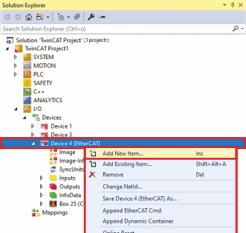
- ►Expand Solution Explorer > TwinCAT Project > I/O > Devices
- ►Right-click on Device (EtherCAT) to open the context menu
- ►Click Add New Item... in the context menu
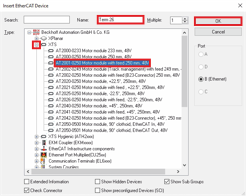
The Insert Device dialog box opens.
- ►Expand Beckhoff Automation GmbH & Co. KG > XTS
- ►Select AT2001-0250 Motor module with feed 250 mm, 48 V
- ►If required, enter a name for the module in the input field Name
- ►Confirm with OK
A Term (AT2001-0250) is added to the EtherCAT master.
Further Information