180° curved segments
 | Mounting example For the mounting example of a simple symmetrical system with 180° curved segments, two curved segments must be prepared in the same way. |
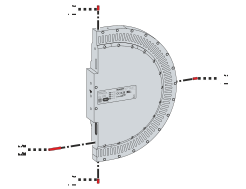
- ►Insert short locating pins [1] and a long locating pin [2] into module
Notice | |
Use the correct seal Only use the seal supplied with the module or a seal from the corresponding Module connector cards [+] accessories to prevent dust and liquids from entering the module. |
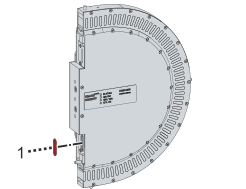
- ►Insert the seal [1]
- ►Ensure that the wide side of the seal is inserted into the module
Further information can be found in chapter Position of the seal.
Connector card
With a connector card, one or more modules without infeed are connected with a power supply module to form an infeed line. Each module without infeed must be connected to a power supply module via a connector card.
Notice | |
Insert connector card correctly The connector card only fits into the module in one position. The connector card must be easy to insert into the module. Do not use any tools to knock the connector card into the module. If you insert the connector card incorrectly into the module or insert the wrong connector card into the module, the contacts on the connector card or the contacts in the module may be damaged. |
Notice | |
Use the correct connector card Due to the change in production, the long connector card ZX2000-0100 is gradually being replaced by the short connector card ZX2000-0200. Only use the connector card included in the scope of delivery or a connector card from the corresponding module connector cards [+] accessories. If you are unsure which connector card to insert into the module, insert the connector card carefully. Make sure that the connector card is not completely inserted into the module. Further information can be found in chapter Connector card. |
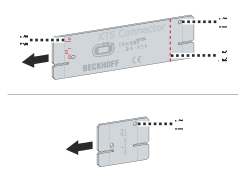
Long connector card
The cut-out [1] must be located on the upper, outer edge of the connector card. Push the connector card into the module up to the marking [2]. The lettering insert this side first [3] must be inserted into the module at the position of the seal. The lettering Beckhoff must be on the side of the name plate.
Short connector card
The cut-out [1] must be located on the upper, outer edge of the connector card. The lettering XTS-Connector must be on the side of the name plate.
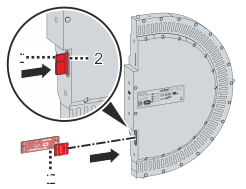
- ►Insert the correct connector card [1] at the position of the seal [2]
Further information can be found in chapter Connector card.
Screws
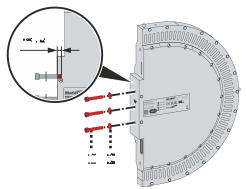
- ►Insert the screws [1] with washers [2] into the curved segment to a maximum depth of 4 mm