PLC
Version
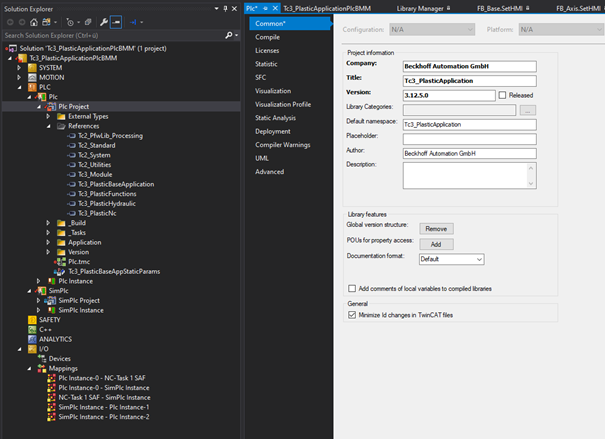
The currently used version of your template and/or project can be determined as follows:
- PLC > PLC > PLC Project > Properties (right click) > Common > Version:
References
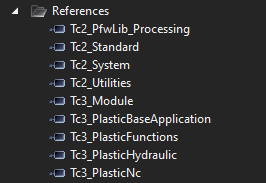
The following libraries are referenced in the project in addition to some general libraries from the general TwinCAT pool:
- Tc2_PfwLib_Processing
- Temperature control algorithms
- Tc3_PlasticBaseApplication
- Collection of application-oriented classes and HMI interfaces, explained in this documentation
- Tc3_PlasticFunctions
- Abstracted axis interface, inverter axes, actuators, machine data and other technology functions
- Tc3_PlasticHydraulic
- Hydraulic axes compatible with virtual axis interface
- Tc3_PlasticNc
- Electric NC-based axes compatible with the virtual axis interface
 | Error despite existing library For compatibility and maintenance purposes, the versions of the included libraries are fixed. If you have already worked with the mentioned libraries in past versions, you have to install the updated versions. These can be found in the TwinCAT Package Manager or in the supplied project folder under Dependencies.
|
Notice | |
Adaptation to an older version not permitted Do not change the library versions set in the project to an older version. Incompatibilities and unpredictable behavior of the software may occur! |
Code
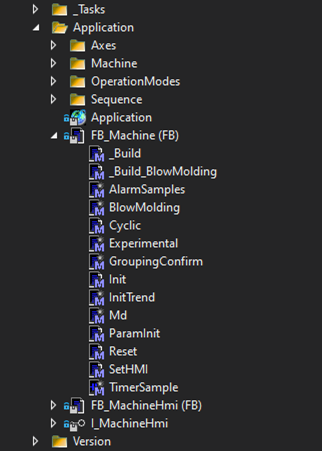
The control code is divided into three main folders.
> _Tasks: Instantiation of the runtime and definition of the task calls
> Application: Application programs
- Axes: Instantiations of the axes
- Machine: Instantiations of general machine components
- OperationModes: Operation mode class
- For free customization not included in the library, but in the template.
- Sequence: Sequence program and operation mode-dependent manual functions
- GVL application: Instances for sequence program, operation mode, operating data, etc…
- FB_Machine: Main program for linking subprograms
- _Build: Build method, called outside the runtime context
- _Build_Xyz: Machine type-specific build definition
- AlarmSamples: Sample of the use of alarms
- BlowMolding: Specific links for blow molding machines
- Cyclic: Cycle method, can be regarded as a MAIN program
- Experimental: Test method for exemplary test procedures
- GroupingConfirm: Handshake for using the FB_Temperature.Groups(x)
.EnableConfigConfirmation - Init: Initializes interfaces of the class
- InitTrend: Defines the configuration of the FB_TrendHmi instance
- Md: Handshake for saving and loading the machine data overview
- ParamInit: Parameter initialization (here for temperature and monitoring)
- Reset: Acknowledgement of errors
- SetHMI: Sets the interface to FB_MachineHmi
- TimerSample: Sample of the use of timers in the COP programming language
- FB_MachineHmi: HMI elements of the main program
- I_MachineHmi: Interface of the HMI elements of the main program
> Version: Automatically generated GVL with the used project version
| Further information about the PLC code |
SimPlc
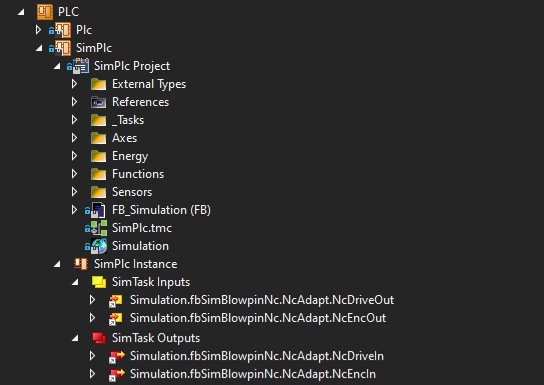
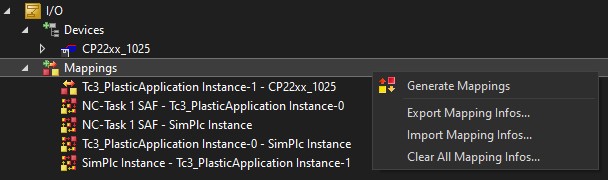
In the second PLC (SimPlc) a machine simulation is implemented. This can be connected to the main control via mapping (comparable to the I/O of a machine). This allows the PLC to be implemented without including simulation elements. In addition, simulation can also be extended with the elements of PLC programming. This offers the advantage that the control PLC from project preparation does not have to be adapted to operation with a real machine. Only the mapping to I/O components is required.
| Switching from simulation <-> real operation The project can be switched from simulation to real operation (and vice versa) via the mapping export/import. This function can be used by right-clicking on the TwinCAT project junction "Mappings". |