MotionParams
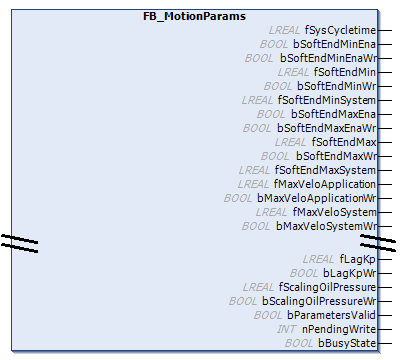
This Corefunction is used to display a range of parameter values for a motion unit.
The writeable parameters can be saved using the Persist option with the functionality provided by NC (TF5000) or Hydraulic Library (TF5810). Alternatively, Plastic Technology Functions also offers a storage option via the machine data. For this purpose, FB_MotionParams already implements a fully-fledged machine data component. You will find an example of the setup in the lower part of this description.
 | Support of the parameters depends on the technology Some parameters are only available for specific drive technologies. Please note the comments in the “Selection” column! |
| Function is asynchronous An implementation of runtime switching via this function block must always take the state of the function block into account. A written parameter does not become active immediately.
|
| Axis may need to be disabled Some parameters cannot be written while an axis is enabled. |
Syntax:
FUNCTION_BLOCK FB_MotionParams EXTENDS FB_MdMotionParams Properties
Name | Type | Access | Selection | Description |
|---|---|---|---|---|
I_ActuatorParamsH | Get |
| Access to parameters for the base position of an actuator. | |
I_ActuatorParamsH | Get |
| Access to parameters for the working position of an actuator. | |
AsymTargeting | BOOL | Get, Set |
| TRUE if the parameters for the target approach are direction-dependent. Otherwise, the parameters for the negative direction are ignored and the parameters for the positive direction are used regardless of the direction. |
AutoBrakeCalculation | BOOL | Get, Set |
| TRUE if the braking distance is determined automatically. |
AxisIsNc | BOOL | Get | / | TRUE, if the axis is operated with TwinCAT NC. |
BrakeDistanceM | LREAL | Get, Set |
| The braking distance in negative direction. See also AsymTargeting. |
BrakeDistanceP | LREAL | Get, Set |
| The braking distance in positive direction. |
CreepDistanceM | LREAL | Get, Set |
| The creep distance in negative direction. See also AsymTargeting. |
CreepDistanceP | LREAL | Get, Set |
| The creep distance in positive direction. |
CreepSpeedM | LREAL | Get, Set |
| The creep speed in negative direction. |
CreepSpeedP | LREAL | Get, Set |
| The creep speed in positive direction. |
CycleTime | LREAL | Get | / | The cycle time of the task in which the real-time functions of the axis are executed. |
CylinderAreaA | LREAL | Get, Set |
| Cylinder area of the A side of the activated hydraulic cylinder (positive direction). |
CylinderAreaB | LREAL | Get, Set |
| Cylinder area of the B side of the activated hydraulic cylinder (negative direction). |
DefaultAcceleration | LREAL | Get, Set |
| The acceleration used when a command is executed with an acceleration of 0. |
DefaultDeceleration | LREAL | Get, Set |
| The deceleration applied when a command is executed with an acceleration of 0. |
DefaultJerk | LREAL | Get, Set | / | Reserved for future use. |
DriveAcceptBlockedSignal | BOOL | Get, Set |
| If TRUE, the axis does not immediately enter the error state as soon as the drive stops following the setpoint due to a stop signal (e.g., limit switch). |
DriveIsCoE | BOOL | Get | / | TRUE, if the axis has a CoE interface. |
DriveIsServo | BOOL | Get | / | TRUE if the axis is a servo drive. |
DriveIsSimulated | BOOL | Get | / | TRUE if the drive of the axis is simulated. |
DriveIsSoE | BOOL | Get | / | TRUE, if the axis has a SoE interface. |
DriveReversed | BOOL | Get, Set |
| TRUE if the drive of the axis is inverted. The outputs are swapped for actuators. |
DriveTorqueWeighting | LREAL | Get | / | Scaling factor of the actual torque value of the drive. |
DriveType | UDINT | Get | / | A numeric identifier for the type of the connected drive. The meaning of the constants is defined in the Tc2 NC or the Tc2_Hydraulics library. |
EncoderInterpolation | LREAL | Get, Set |
| The divider for the encoder evaluation. It specifies the number of increments corresponding to the distance specified by EncoderWeighting. |
EncoderIsAnalog | BOOL | Get | / | TRUE if the encoder of the axis uses an analog input. |
EncoderIsSimulated | BOOL | Get | / | TRUE if the encoder of the axis is simulated. |
EncoderMask | UDINT | Get | / | Encoder mask for encoder value overflow |
EncoderMode | UDINT | Get, Set |
| Operation mode of the encoder |
EncoderReversed | BOOL | Get, Set |
| TRUE if the encoder / feedback of the axis is inverted. The feedback inputs are swapped for actuators. |
EncoderType | UDINT | Get | / | A numeric identifier for the type of the connected encoder. The meaning of the constants is defined in the Tc2 NC or the Tc2_Hydraulics library. |
EncoderWeighting | LREAL | Get, Set |
| The factor for encoder evaluation. It specifies the distance corresponding to a number of increments specified by EncoderInterpolation. |
EncoderZeroShift | LREAL | Get, Set |
| The zero point shift of the encoder. |
HasAutoLimiting | BOOL | Get | / | TRUE if the axis uses an internal automatic limiting function. |
LagControlled | BOOL | Get | / | TRUE if the axis has a position controller. |
LagCtrlKp | LREAL | Get, Set |
| The kP factor of the position controller. |
LagFilter | LREAL | Get, Set |
| The filter time of the following error monitoring. |
LagLimit | LREAL | Get, Set |
| The threshold value of the following error monitoring. |
LagMonitored | BOOL | Get, Set |
| TRUE, if the following error monitoring of the axis is active. |
MaxAcceleration | LREAL | Get, Set |
| The maximum permissible acceleration. A write operation on this parameter is always also applied to DefaultAcceleration. |
MaxDeceleration | LREAL | Get, Set |
| The maximum permissible deceleration. A write operation on this parameter is always also applied to DefaultDeceleration. |
MaxJerk | LREAL | Get, Set |
| The maximum permissible jerk. |
MaxVeloApplication | LREAL | Get, Set |
| An additional velocity restriction. |
MaxVeloSystem | LREAL | Get, Set |
| The maximum velocity of the axis. This parameter acts as a reference value for the maximum velocity output of the drive interface. |
MinVeloApplication | LREAL | Get, Set |
| The minimum velocity of the axis. |
Persist | BOOL | Get, Set |
| Enables the persistent saving of parameter write operations of this function block on the target system. |
ScalingOilPressure | LREAL | Get, Set |
| The scaling factor for the actual pressure acquisition. |
SoftEndMax | LREAL | Get, Set |
| The maximum software limit switch. |
SoftEndMaxEna | BOOL | Get, Set |
| Enable for the maximum software limit switch. |
SoftEndMaxSystem | LREAL | Get, Set |
| For the load side of transforming axes: The converted maximum software limit switch of the drive side. For the drive side of transforming axes: The converted maximum software limit switch of the load side. For non-transforming axes: A copy of the maximum software limit switch. |
SoftEndMin | LREAL | Get, Set |
| The minimum software limit switch. |
SoftEndMinEna | BOOL | Get, Set |
| Enable for the minimum software limit switch. |
SoftEndMinSystem | LREAL | Get, Set |
| For the load side of transforming axes: The converted minimum software limit switch of the drive side. For the drive side of transforming axes: The converted minimum software limit switch of the load side. For non-transforming axes: A copy of the minimum software limit switch. |
Valid | BOOL | Get | / | TRUE if all parameters are valid. |
VeloMonitored | BOOL | Get, Set |
| TRUE if the velocity monitoring of the axis is active. |
VeloLagLimit | LREAL | Get, Set |
| The tolerance window for triggering the velocity monitoring. |
BusyState | BOOL | Get | / | TRUE, if the function block writes changed parameters. |
ReadyState | BOOL | Get | / | TRUE if the function block has loaded all parameters at least once. |
MaxAccApplication1 | LREAL | Get, Set | Obsolete | Returns the value of DefaultAcceleration |
MaxDecApplication1 | LREAL | Get, Set | Obsolete | Returns the value of DefaultDeceleration |
HasTorqueLimiting1 | BOOL | Get | Obsolete | Returns the value of HasAutoLimiting. |
MinVeloJog1 | LREAL | Get, Set | Obsolete | Returns the value of MinVeloApplication. |


1Obsolete
Legend
| TF5810 Hydraulic Positioning |
| TF5000 NC PTP |
| TF8560 Inverter Axis |
| TF8560 Digital Actuator |
 Interfaces
Type | Description |
|---|---|
I_Corefunction | Standard interface on FB_Corefunction. |
I_MotionParams | Standard interface on FB_MotionParams. |
I_MdComponent | Interface for use as machine data component |
Example:
iAxisBase.MotionParams.SoftEndMax := fAxisStroke;Example | Configure machine data:
VAR
    iComponent:        I_MdComponent;
    fbAxisData:        FB_MdContainer;
END_VAR

// query the compatible component interface from the axis motion params
IF __QUERYINTERFACE(iAxisBase.MotionParams, iComponent) AND NOT bAppend THEN
    bAppend := fbAxisData.AddComponent(iComponent);
END_IF

// A saving commands is received
IF bSave THEN
    fbAxisData.Save := TRUE;
    IF fbAxisData.Done THEN
        fbAxisData.Save := FALSE;
        bSave := FALSE;
    END_IF
END_IF

fbAxisData.Cyclic();
Requirements
Development environment | Target platform | PLC libraries to include |
|---|---|---|
TwinCAT v3.1.4024.71 | PC or CX (x64, x86) | Tc3_PlasticFunctions (>= v12.14.0.0) |