Cam configuration
Cam configuration dialog is available only if CamConfig attribute is linked to an array of FB_CamSwitchHmi objects.
Operator can start this dialog by clicking on config button that will appear in the header area.
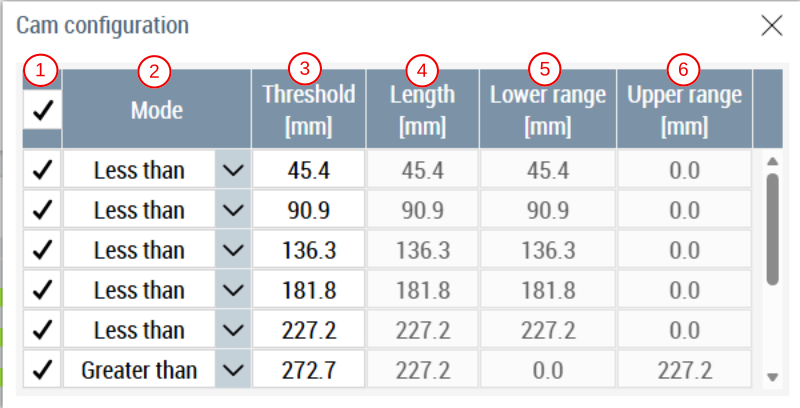
In this dialog the operator can edit properties for each cam switch.
- InUse: Check box changes the InUse property. Only cam switches that have InUse set to
trueare visible and editable. - Mode: Combobox to select between 4 different ways to configure a cam switch.
- Less than: In this mode lower range of cam switch is equal to threshold, this activates cam switch for all values less than threshold.
- Greater than: In this mode upper range of cam switch is equal to threshold, this activates cam switch for all values greater than threshold.
- Hysteresis: In this mode user can enter length of the cam, this length is divided equally in lower and upper range causing threshold to act as middle point of total length.
- Asymmetrical: This mode allows user to directly enter lower and upper range values.
- Threshold: This sets the threshold value for each cam switch.
- Length: Total length of the cam switch, this field is only editable in ‘Hysteresis’ mode.
- Lower range: User can observe the lower range for cam switch, this field is only editable in ‘Asymmetrical’ mode.
- Upper range: User can observe the upper range for cam switch, this field is only editable in ‘Asymmetrical’ mode.