FB_MTP_OpcUaSessionMonitoring
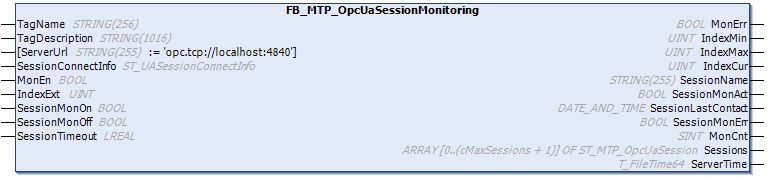
The FB_MTP_OpcUaSessionMonitoring function block can be used to monitor the current connections (sessions) to an OPC UA server.
Connection settings for the OPC UA server
The input variable sOpcUaServerUrl specifies the server's address. By default, the local OPC UA server opc.tcp://localhost:4840 is selected.
The variable stOpcUaSessionConnectInfo describes the server's security settings (see InfoSys). The default settings are:
OpcUaSessionConnectInfo     : ST_UASessionConnectInfo := (
      sApplicationName      := 'MTP Client',
      eSecurityMode         := E_UASecurityMsgMode.eUASecurityMsgMode_None,
      eSecurityPolicyUri    := E_UASecurityPolicy.eUASecurityPolicy_None
      eTransportProfileUri  := eUATransportProfileUri_UATcp,
      tConnectTimeout       := T#1M,
      tSessionTimeout       := T#1M,
      stUserIdentTokenType  := (
         eUserIdentTokenType := E_UAUserIdentityTokenType.eUAUITT_Anonymous,
         sTokenParam1        := '',
         sTokenParam2        := '')
      );
 | The TwinCAT OPC UA Client is required for the function block. To establish the connection, the certificate must be moved at the file level after the initial connection to the OPC UA server has been established: For client versions < 2 From C:/ProgramData/Beckhoff/TF6100-OPCUA/TcOpcUaClient/PKI/CA/rejected/Certs After C:/ProgramData/Beckhoff/TF6100-OPC UA/TcOpcUaClient/PKI/CA/trusted/Certs From client version 2 From C:\Program Files (x86)\Beckhoff\TwinCAT\3.1\Target\OpcUa\Client\PKI\CA/rejected After C:\Program Files (x86)\Beckhoff\TwinCAT\3.1\Target\OpcUa\Client\PKI\CA\trusted\certs |
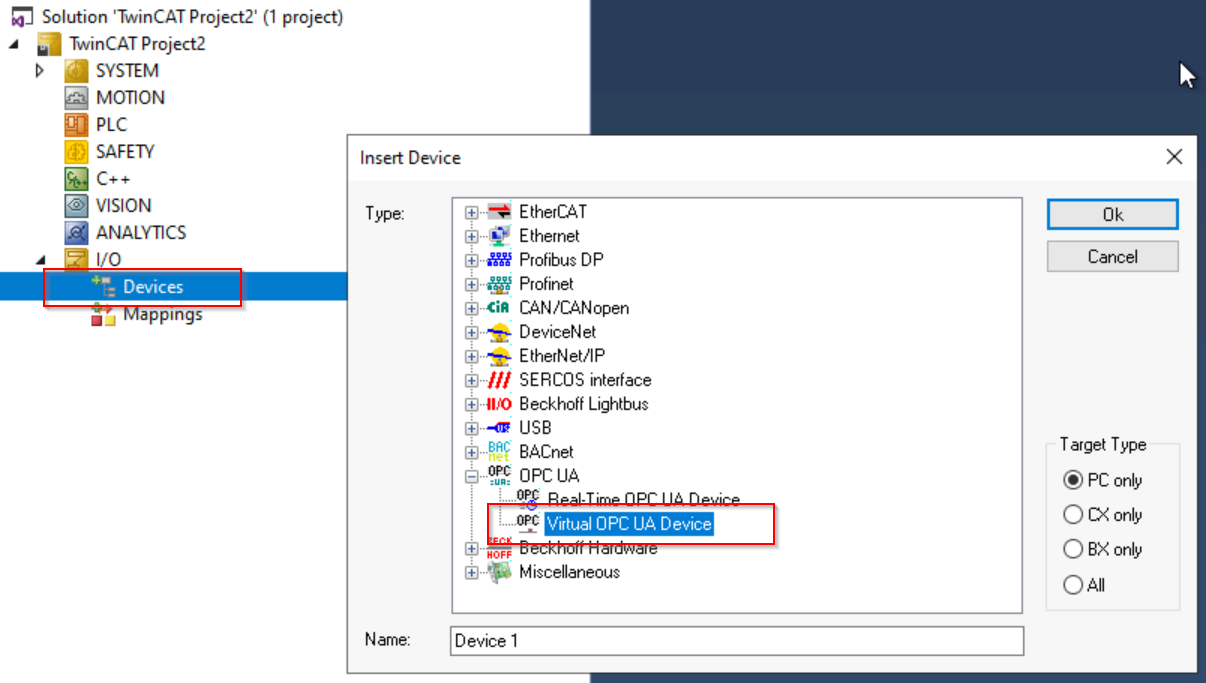
Starting with Client Version 2, the FB_MTP_OpcUaSessionMonitoring requires a OPC UA Virtual Device:
Add a new I/O device to the TwinCAT project.
Use OPC UA Virtual Device as the device type:
Monitor connections
Monitoring of the OPC UA server is started using the variable MonEn. For each connection, an entry is created in the output array Sessions. The array consists of elements of type ST_MTP_OpcUaSession.
| The output array |
The Sessions array has 100 entries. IndexMin is fixed at 1 and indicates the start of the array range being used. The value IndexMax corresponds to the number of current connections and thus marks the end of the range being used.
When an OPC UA client disconnects from the server, it is removed from the list and the number of IndexMax is reduced. If, on the other hand, the client loses its connection to the server, the client will still appear in the list.
IndexCur describes the current entry in this list. The values of this entry are written cyclically to the output variables SessionName, SessionLastContact, SessionTimeout, SesSessionMonAct and SessionMonErr.
The current entry in the list, IndexCur, can be changed using the variable IndexExt. IndexExt It must fall within the array limits IndexMin and IndexMax. If the value falls outside these limits, IndexMin will be selected as the current entry
Connection monitoring for the current connection can be enabled using the variable SessionMonOn or disabled using the variable SessionMonOff. When monitoring is enabled, SessionMonAct = TRUE.
When MonEn = TRUE monitoring is enabled, at least one connection must be monitored. If this is not the case, the variable MonErr = TRUE is set. The number of monitored connections is represented by the variable MonCnt.
A connection error occurs when monitoring is enabled SessionMonAct = TRUE and the difference between the server time ServerTime and the last contact SessionLastContact is greater than SessionTimeout. If at least one connection has a fault, MonErr = TRUE.
 Inputs
Name | Type | Description | OPC UA access |
|---|---|---|---|
TagName | STRING | Name of the interface | - |
TagDescription | STRING | Description of the interface | - |
ServerUrl | STRNG | URL of the OPC UA server to be monitored | - |
SessionConnectInfo | ST_UASessionConnectInfo | Connection settings for the server | - |
MonEn | BOOL | Enabling of | Read/write |
IndexExt | UINT | External index query in the list of available connections | Read |
SessionMonOn | BOOL | 1: Enable monitoring for the current connection. | Read/write |
SessionMonOff | BOOL | 1: Turn off monitoring for the current connection. | Read/write |
SessionTimeOut | LREAL | Permissible timeout for the current connection (ms). | Read/write |
| The variables |
 Outputs
Name | Type | Description | OPC UA access |
|---|---|---|---|
MonErr | BOOL | 1: One of the monitored connections has timed out. | Read |
IndexMin | UINT | The smallest entry in the list of all available connections | Read |
IndeMax | UINT | Largest entry in the list of all available connections | Read |
IndexCur | UINTUINT | Current index in the list of available connections | Read |
SessionName | STRING | Name of the current connection (read from the server) | Read |
SessionLastContact | Date_AND_TIME | Last contact for the current connection (read from the server) | Read |
SessionMonAct | BOOL | 1: Current connection is being monitored 0: The current connection is not being monitored. | Read |
SessionMonErr | BOOL | The current connection has timed out. | Read |
MonCnt | SINT | Number of monitored connections | Read |
Sessions | ST_OpcUa_SessionMonitoring | List of current connections to the OPC UA server. | - |
ServerTime | T_FileTime64 | Current server time (UTC) | - |
| The variables |
External variables
Name | Type | Description | OPC UA access |
|---|---|---|---|
fbOpenConnection | UA_Connect | Function block for establishing a connection (At runtime, you can view the state of the connection being established to the server here.) |
|