Code Detection
This sample shows the localization and classification of 1D and 2D codes using neural networks. It demonstrates the use of the functions:
- F_VN_DetectCodesNeuralNetwork for the detection of 1D and/or 2D codes.
- F_VN_ResizeRegion_TcVnRectangle_DINT to adjust the size of the regions found for successor process steps.
- Visualization of the code regions and code types found.
Explanation
The F_VN_DetectCodesNeuralNetwork function is used to localize 1D and 2D codes and returns the probable code regions as rectangles as well as the associated code types. This approach is particularly advantageous in the case of unsteady backgrounds, varying illumination or many codes in the image, as a successor code reading function can only be executed on the recognized partial areas. This generally reduces the computational effort required by the reading functions to find a code, as fewer pixels need to be checked.
In the sample, the parameter eModelType can be used to switch between different neural network models (ETcVnCodeDetectionModel) at runtime. As these differ in their input resolution and detection range, the compromise between recognition accuracy and execution speed can be evaluated. However, confusion can also occur if structures in the image resemble a code, especially in the scaled input image.
The models are systematically divided into two dimensions:
- Recognition scope (prefix):
TCVN_CDM_DETECT_1_x(1D codes and 2D codes [QR, DATAMATRIX and DOTCODE])TCVN_CDM_DETECT_2_x(only 1D codes)TCVN_CDM_DETECT_3_x(only 2D codes)- Input resolution (suffix):
TCVN_CDM_DETECT_x_1 (224×224 pixels, maximum speed)TCVN_CDM_DETECT_x_2 (352×256 pixels, balanced)TCVN_CDM_DETECT_x_3 (416×352 pixels, highest accuracy for small codes)
The input image is automatically scaled internally by the function to this respective target resolution.
In addition, the variable eCodeTypeSelection can be used to define which specific code types should be searched for within the selected model scope. To filter for several selected types at the same time, the enums can be linked with a bitwise OR operation (e.g. eCodeTypeSelection := TCVN_CT_QR OR TCVN_CT_DATAMATRIX).
Model initialization
The model must be loaded before code detection can be carried out. This is done once when the program starts using the function block FB_VN_InitializeFunction.
If the model is to be changed at runtime or is no longer required, the model can be deinitialized with F_VN_DeinitializeFunction in order to release the memory again.
Variables
bInitialized    :   BOOL := FALSE;
eModelType      :   ETcVnCodeDetectionModel := TCVN_CDM_DETECT_1_1;
fbInit          :   FB_VN_InitializeFunction;
nInitReturnCode :   UDINT;
Code
// Load code detection model
IF NOT bInitialized THEN
    fbInit(eFunction := TCVN_IF_CODEDETECTION, nOptions := eModelType, bStart := TRUE);

    IF NOT fbInit.bBusy THEN
        fbInit(bStart := FALSE);
        IF NOT fbInit.bError THEN
            bInitialized := TRUE;
            nInitReturnCode := fbInit.nErrorId AND 16#FFF;
        ELSE
            nInitReturnCode := fbInit.nErrorId AND 16#FFF;
        END_IF
    END_IF
END_IF
Localization of code regions
After successful initialization, cyclic detection is performed on the current input image using the function F_VN_DetectCodesNeuralNetwork. The function returns two containers. On the one hand, ipCodeRegions contains the coordinates of the regions found as rectangles and, on the other hand, ipCodeTypes contains the corresponding recognized code types.
Variables:
ipCodeRegions       :   ITcVnContainer;
ipCodeTypeResult    :   ITcVnContainer;
eCodeTypeSelection  :   ETcVnCodeType := TCVN_CT_ANY;
Code:
hr := F_VN_DetectCodesNeuralNetwork(
        ipSrcImage      := ipImageIn,
        ipCodeRegions   := ipCodeRegions,
        ipCodeTypes     := ipCodeTypeResult,
        eModelType      := eModelType,
        nCodeType       := eCodeTypeSelection,
        hrPrev          := hr);
Evaluation and adjustment of the regions
If the function was executed successfully and at least one code was found, it is iterated over all detected elements to retrieve the individual positions and types.
As the models often output the regions very precisely and tightly around the code, the function F_VN_ResizeRegion_TcVnRectangle_DINT is applied to the results. This enlarges the rectangles by an adjustable factor (fWidthRatio, fHeightRatio) and an absolute minimum pixel offset (nMinWidthOffset, nMinHeightOffset). This is essential for a subsequent code reading function to ensure that the required quiet zone is completely contained in the image section.
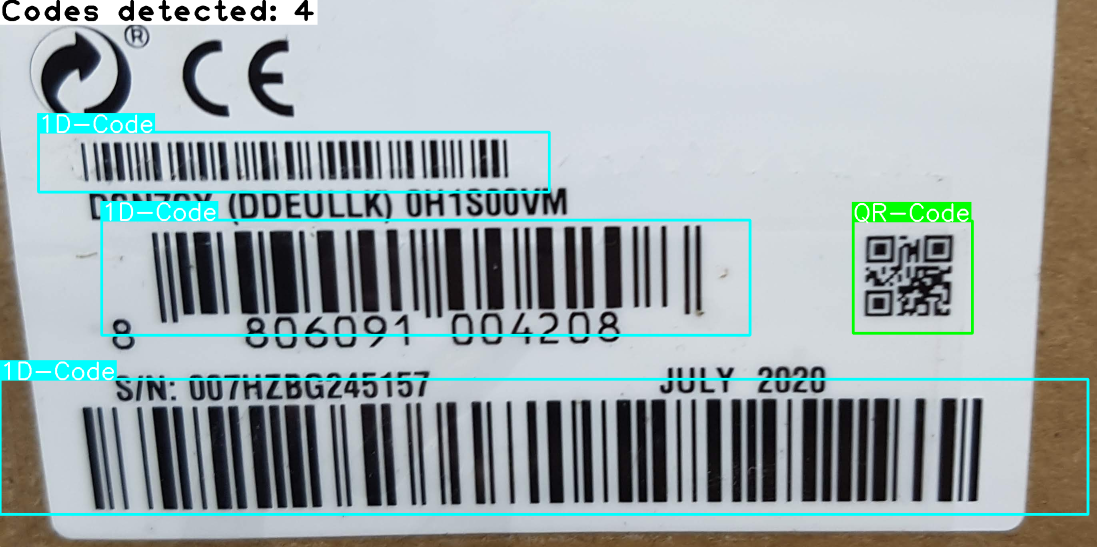
Finally, a CASE statement evaluates the code type found in order to assign specific colors and labels for the visual representation depending on the type, as shown in the sample. At this point or in the following code, the corresponding code reading functions can be added with this information.
Variables:
fWidthRatio         :   REAL := 1.15;
fHeightRatio        :   REAL := 1.15;
nMinWidthOffset     :   DINT := 10;
nMinHeightOffse     :   DINT := 10;
hr                  :   HRESULT;
ipImageIn           :   ITcVnImage;
eCodeTypeResult     :   ETcVnCodeType;
stRectangle         :   TcVnRectangle;
nDetectedCodes      :   ULINT;
i                   :   ULINT;
Code:
IF hr = S_OK THEN
    // Get number of detecded codes
    hr := F_VN_GetNumberOfElements(ipCodeRegions, nDetectedCodes, hr);

    IF nDetectedCodes > 0 THEN
        FOR i := 0 TO nDetectedCodes – 1 DO
            // Get code type and region from detection results
            hr := F_VN_GetAt_ULINT(ipCodeTypeResult, eCodeTypeResult, i, hr);
            hr := F_VN_GetAt_TcVnRectangle_DINT(ipCodeRegions, stRectangle, i, hr);

            // Enlarge detection region to meet the respective code requirements for the quiet zone
            hr := F_VN_ResizeRegion_TcVnRectangle_DINT(
                    stSrcRect           := stRectangle,
                    stDestRect          := stRectangle,
                    fWidthRatio         := fWidthRatio,
                    fHeightRatio        := fHeightRatio,
                    nMinWidthOffset     := nMinWidthOffset,
                    nMinHeightOffset    := nMinHeightOffset,
                    ipImage             := ipImageIn,
                    hrPrev              := hr);

            // Evaluate the recognized code type and its region
            CASE eCodeTypeResult OF
                TCVN_CT_1D:
                    // ...
                TCVN_CT_2D:
                    // ...
                TCVN_CT_QR
                    // ...
                TCVN_CT_DATAMATRIX:
                    // ...
                TCVN_CT_DOTCODE:
                    // ...
            END_CASE
        END_FOR
    ELSE
        // No code detected
    END_IF
ELSE
    IF hr = S_FALSE THEN
        // No code detected
    ELSE
        // Error: See HRESULT for more details
    END_IF
END_IF
Result
The result of the localization is displayed with colored rectangles and optional type labels in the ipImageResultDisp image. In addition, a status text such as "Codes detected: n" or "No code detected" or, in the event of an error, the HRESULT code is displayed in the top left-hand corner. The image shown was analyzed using the TCVN_CDM_DETECT_1_2 model:
For debugging purposes, the sample also generates the ipImageModelInputDisp image. It shows the input image as it is scaled down internally by the function to the selected model resolution. This gives you a direct visual impression of which details and aspect ratios the neural network is actually processing as input.
By default, the sample uses the TCVN_CDM_DETECT_1_1 model (224×224 pixels). In the case of very small codes or input images with unfavorable aspect ratios, internal downscaling to this model size can lead to small structures being lost. As a result, codes may not be detected or may be incorrectly classified. For example, QR codes and DataMatrix codes for the network can hardly be distinguished visually when they are greatly reduced in size, which in some cases leads to misclassifications.
To optimize detection and classification accuracy in these cases, there are two possible solutions, which can also be combined:
- Higher model resolution: Changing the parameter
eModelTypeto a model with a larger input (e.g.TCVN_CDM_DETECT_1_2orTCVN_CDM_DETECT_1_3) provides the neural networks with more details. This makes the correct classification of types much more reliable, but increases the execution time. - Using an ROI: Setting an ROI on the input image before detection reduces the image section. This allows the aspect ratio to be brought closer to the format of the model input and also increases the effective pixel resolution for the model. Ideally, an ROI is set according to the aspect ratio used by the model. This avoids or at least minimizes distortion or compression of the codes. This often improves recognition without having to use a more computationally intensive model.