History
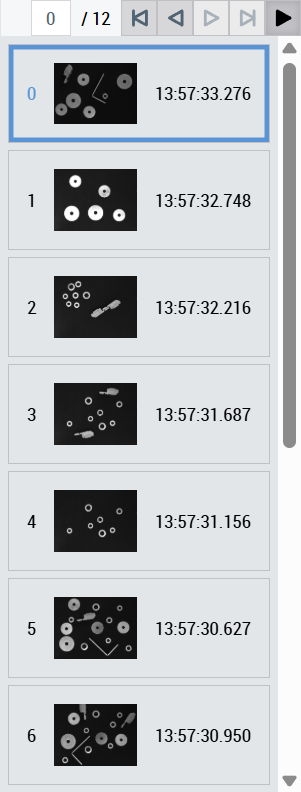
The TcHmiVnHistory history control controls the history functionality of an ImageWatch control via a toolbar and provides a graphical list (Image List) of the history images. The description of each configuration option can be found under the following categories on this page. For each category there are sub-chapters with further information. This control can only be used in connection with an ImageWatch control and only provides the display and operation of the history functionality. The data and the associated configuration can be found in ImageWatch Control.
 | For all the following attributes, the control has a getter and a setter method. For example, for the attribute All further attributes, events and permissions provided by the Controls base class can be found in the TwinCAT HMI documentation. |
Category: Colors
Attribute | Type | Description |
|---|---|---|
|
| Color of the toolbar (see Categories Toolbar). |
|
| Color of the index in the list. |
|
| Color of the index border in the list. Only effective if |
|
| Color of the index background in the list. |
|
| Color of the timestamp in the list. |
|
| Color of the timestamp border in the list. Only effective if |
|
| Timestamp background color in the list. |
|
| Element background color in the list. |
|
| Highlight color of the selected element. |
Category: Common
The following attribute is used to specify the link to the ImageWatch control.
Attribute | Type | Description |
|---|---|---|
| TcHmiVnImage | Link to the ImageWatch Control instance that is to be controlled. |
Category: Toolbar
The following attributes can be used to customize the Toolbar of the control.
Attribute | Type | Description |
|---|---|---|
|
| Toolbar display. |
|
| Input value of the index for the choice or display of the specified history image when |
|
| Buttons to go forward or back one image entry in the image history when |
|
| Buttons to jump to the first or last image received in the history when |
|
| Button to pause the image update of the linked ImageWatch. The history functionality can only be used if |
|
| Button to trigger a browser-specific download of the currently displayed image in original size, see Image download. |
|
| Height of the toolbar. |
|
| Width of the |
Category: List
The following attributes can be used to customize the image list of the control.
Attribute | Type | Description |
|---|---|---|
|
| Display of the image list. |
|
| Orientation of the control, horizontal or vertical. |
|
| Display of the index. |
|
| Display of the image. |
|
| Display of the timestamp. |
|
| Maximizes the image size so that the index and timestamp are on the image. Only effective if |
|
| In vertical view, this determines the image height; in horizontal view, it determines the image width in the list. Only effective if |
TimestampFormat | Function | Function that generates a character string from a timestamp for display in the list. |
|
| Font of the index in the list. |
|
| Font size of the index in the list. |
|
| Font style of the index in the list. |
|
| Font weight of the index in the list. |
|
| Font of the timestamp in the list. |
|
| Font size of the timestamp in the list. |
|
| Font style of the timestamp in the list. |
|
| Font weight of the timestamp in the list. |