System Certificate Store
In system certificate store mode, log in to the MQTT broker using your username and password. The connection is always encrypted, and the broker's server certificate is verified against the operating system's certificate store – that is, against the same list of trusted certificate authorities that your browser uses. This eliminates the need for any manual certificate configuration: You don't need to upload certificate files or make a choice of encryption options.
This mode is suitable for brokers that use a certificate from a publicly trusted certificate authority – such as Let's Encrypt or a commercial provider – and authenticate users via username and password.
Requirements
The MQTT broker must accept an encrypted connection and use a server certificate that the end device already trusts. A certificate issued by your own, non-publicly known certificate authority is not accepted in this mode; in this case, use Expert mode. You will also need the login credentials for the broker.
Connection setup
- In the connection settings, select the System Trust Store mode.
- Enter the broker details: address, port, client ID, and topic.
- Enter your username and password for the broker.
- Establish the connection.
The connection details can also be provided via a QR code.
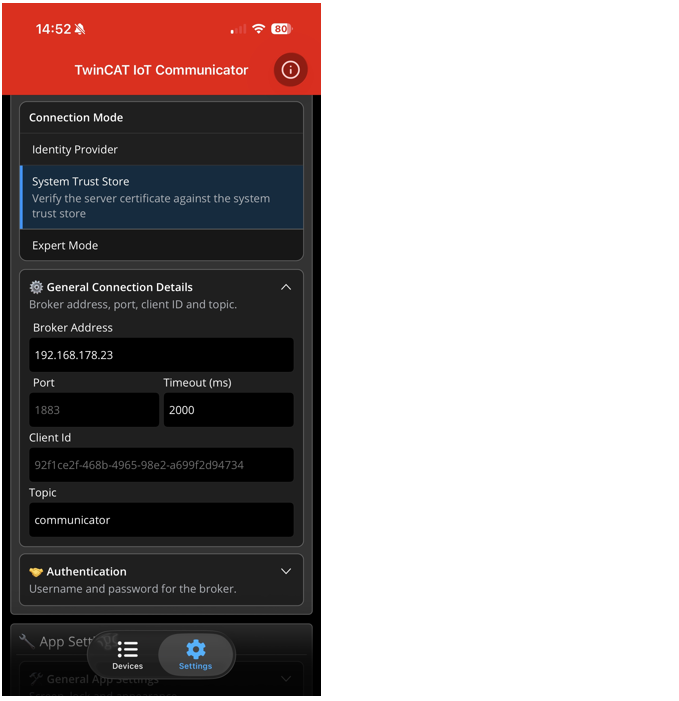
Settings
Setting | Meaning |
|---|---|
Broker Address | IP address or host name of the message broker. |
Port | The port of the message broker. Usually 1883 (MQTT) or 8883 (MQTT TLS). |
Timeout | This setting specifies the time after the connection to the message broker runs into a timeout. After this time, the connection to the second message broker is attempted if a fallback connection is active. |
Client Id | The client ID of the app with which the connection to the message broker is established. If no user-defined value is entered, the unique device identifier of the mobile device is used. |
Topic | Main topic via which the messages from the associated PLC program are communicated. |
Username | User name for logging into the message broker. |
Password | Password associated with the user. |