4-channel LED
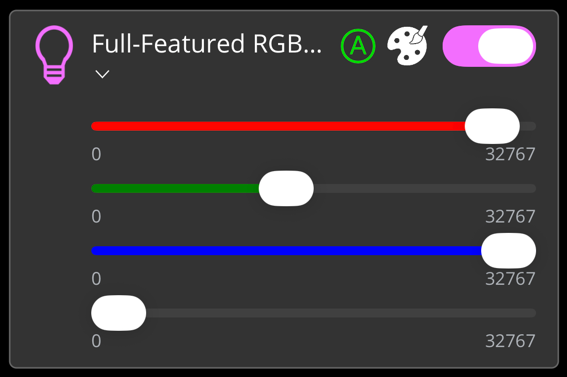
The widget described is suitable for operating RGBW illumination from the app. Compared to the widget RGBW lighting, the focus here is specifically on the 4-channel EL2564. Separate values can be assigned to each individual channel, and a common color value can be set using the color palette. The various configuration options are described below. In the figure all available features of the widget are active.
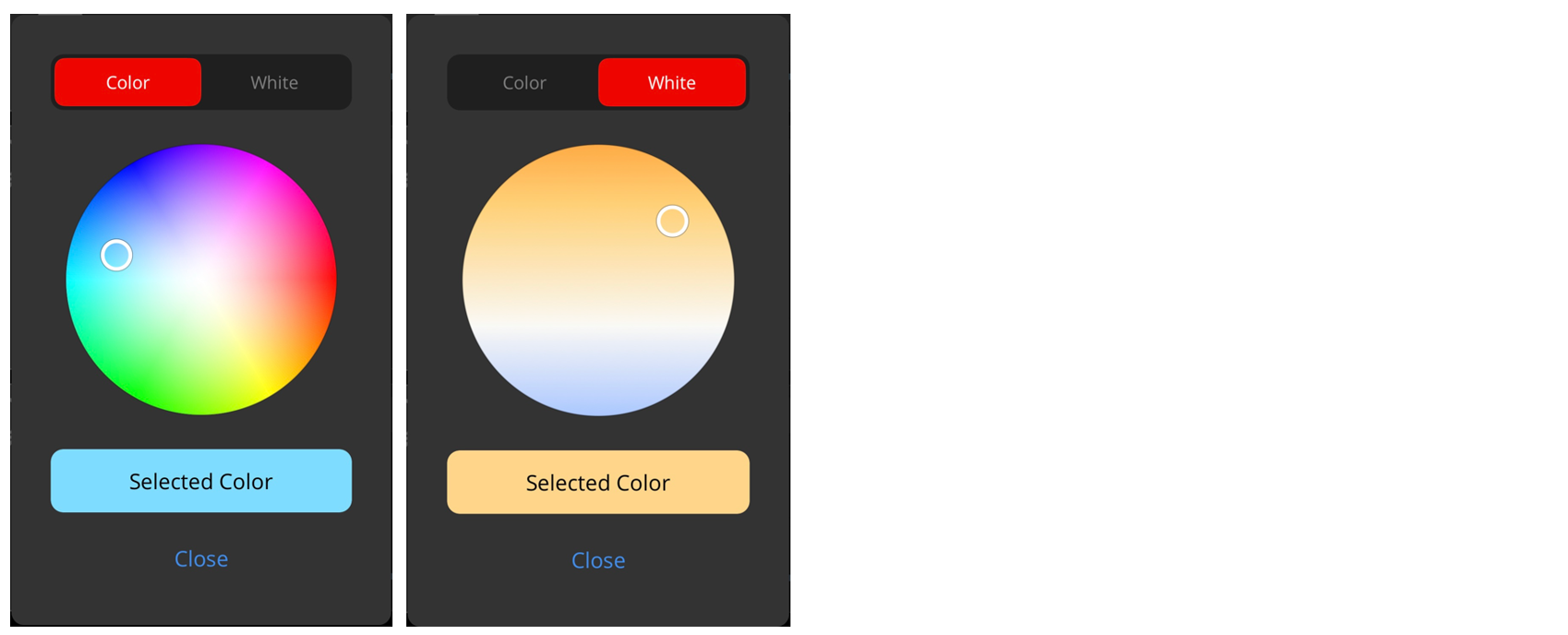
The following illustration shows the color palette that becomes visible by clicking on the color palette icon.
The widget is passed as a substructure in the overall structure of the SendData() method. To set-up the widget, various PLC attributes are used when declaring the structure.
{attribute 'iot.ReadOnly' := 'false'}
{attribute 'iot.DisplayName' := 'Name for Widget'}
{attribute 'iot.WidgetType' := 'RGBWEL2564'}
{attribute 'iot.LedRedSliderVisible' := 'true'}
{attribute 'iot.LedGreenSliderVisible' := 'true'}
{attribute 'iot.LedBlueSliderVisible' := 'true'}
{attribute 'iot.LedWhiteSliderVisible' := 'true'}
{attribute 'iot.LedModeVisible' := 'true'}
{attribute 'iot.LedModeChangeable' := 'true'}
stGeneralWidgetSample : ST_RGBWEL2564WidgetSample;
Attribute | Data type | Description |
|---|---|---|
iot.ReadOnly | BOOL | Determines whether the widget on the app side gets only read access (TRUE) or also additional write access to the PLC (FALSE). |
iot.DisplayName | STRING | The display name of the widget in the app. This will be overwritten by sDisplayName as soon as sDisplayName is not an empty string. |
iot.WidgetType | STRING | Type specification for the widget, in this case: RGBWEL2564. |
iot.LedRedSliderVisible | BOOL | Specifies whether the slider is displayed for the red channel (TRUE) or not (FALSE). |
iot.LedGreenSliderVisible | BOOL | Specifies whether the slider is displayed for the green channel (TRUE) or not (FALSE). |
ioT.LedBlueSliderVisible | BOOL | Specifies whether the slider is displayed for the blue channel (TRUE) or not (FALSE). |
ioT.LedWhiteSliderVisible | BOOL | Specifies whether the slider is displayed for the white channel (TRUE) or not (FALSE). |
ioT.LedModeVisible | BOOL | Determines whether the mode is displayed (TRUE) or not (FALSE). |
ioT.LedModeChangeable | BOOL | Determines whether the mode is adjustable (TRUE) or not (FALSE). |
TYPE ST_RGBWEL2564WidgetSample :
STRUCT
    sDisplayName      : STRING := '';
    nError            : USINT;
    nState            : USINT;
    bOn               : BOOL := FALSE;
    nRed              : INT;
    nGreen            : INT;
    nBlue             : INT;
    nWhite            : INT;
    sMode             : STRING := 'Automatic';
    aModes            : ARRAY[0..1] OF STRING := ['Manual', 'Automatic'];
END_STRUCT
END_TYPE
Attribute | Data type | Description | Display in widget |
|---|---|---|---|
sDisplayName | STRING | Determines the display name of the widget and overwrites the PLC attribute 'iot.DisplayName'. | Display text of the widget. |
nError | USINT | Specifies whether the widget is in an error state. | Between icon and display name of the widget. |
nState | USINT | Specifies which status icon is displayed in the widget. | Top right in the corner of the widget, to the left of the button and the color palette. |
bOn | BOOL | Switches the illumination on (TRUE) or off (FALSE). | Toggle switch top right. |
nRed | INT | The value for the red channel in the value range from 0 to 32767. | Red colored slider. |
nGreen | INT | The value for the green channel in the value range from 0 to 32767. | Green colored slider. |
nBlue | INT | The value for the blue channel in the value range from 0 to 32767. | Blue colored slider. |
nWhite | INT | The value for the white channel in the value range from 0 to 32767. | White colored slider. |
sMode | STRING | Mode of illumination. | The currently displayed mode. |
aModes | ARRAY [0..n] OF STRING | Array of the different modes that can be set by the user. | By pressing on the current mode, the adjustable modes can be displayed. |