RT Ethernet adapter configuration
The TwinCAT Telecontrol Configurator generates the PLC standard code for the "Publisher" or "Subscriber" whenever corresponding Goose or SV control block instances have been configured or imported from an ICD file. In order for these instances to be able to communicate with the outside world, a network adapter (RT Ethernet adapter) is required that can send (Publisher) or receive (Subscriber) the Goose or SV messages. The TwinCAT Telecontrol Configurator automatically creates such an adapter instance of the type "Real-Time Ethernet Adapter (Multiple Protocol Handler)" during project generation. It can be found later in the project tree under the I/O Devices branch. This adapter instance must be configured accordingly, i.e. the I/O configuration must be adapted to the existing hardware and to the target platform on which the project is to run.
A new I/O configuration is also necessary if you change the target platform. This configuration must be done manually in TwinCAT XAE. The following image shows a network adapter instance created by the TwinCAT Telecontrol Configurator that has not yet been configured.
In order to use the real-time network adapter and thus the GOOSE or SV communication, the device used must have a compatible network adapter. The list of supported network chips can be found here: Supported network controllers.
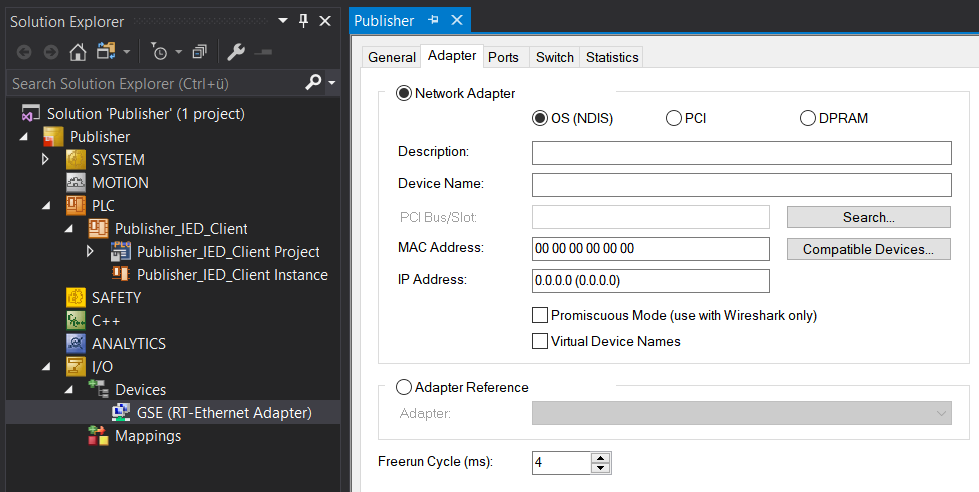
In addition to the I/O configuration of the network adapter, a link must be established between the network adapter and the PLC function blocks for Goose or SV communication. This link can be used to forward the data received from the network adapter to the instance of the Subscriber function block. In the opposite direction, the instance of the Publisher function block can forward the data to be sent to the network adapter. In Goose communication, for example, these are the PLC function block instances of "FB_{IEDName}Gse". See below for details.
Adding an adapter manually
If the network adapter is not yet present below the I/O configuration, it can be added later.
- 1. In the project tree, right-click Devices.
- 2. Select the context menu entry Add New Item….
- 3. From the device list Ethernet select Real-Time Ethernet Adapter (Multiple Protocol Handler).
- 4. Confirm your selection with Ok.
- This adds the adapter.
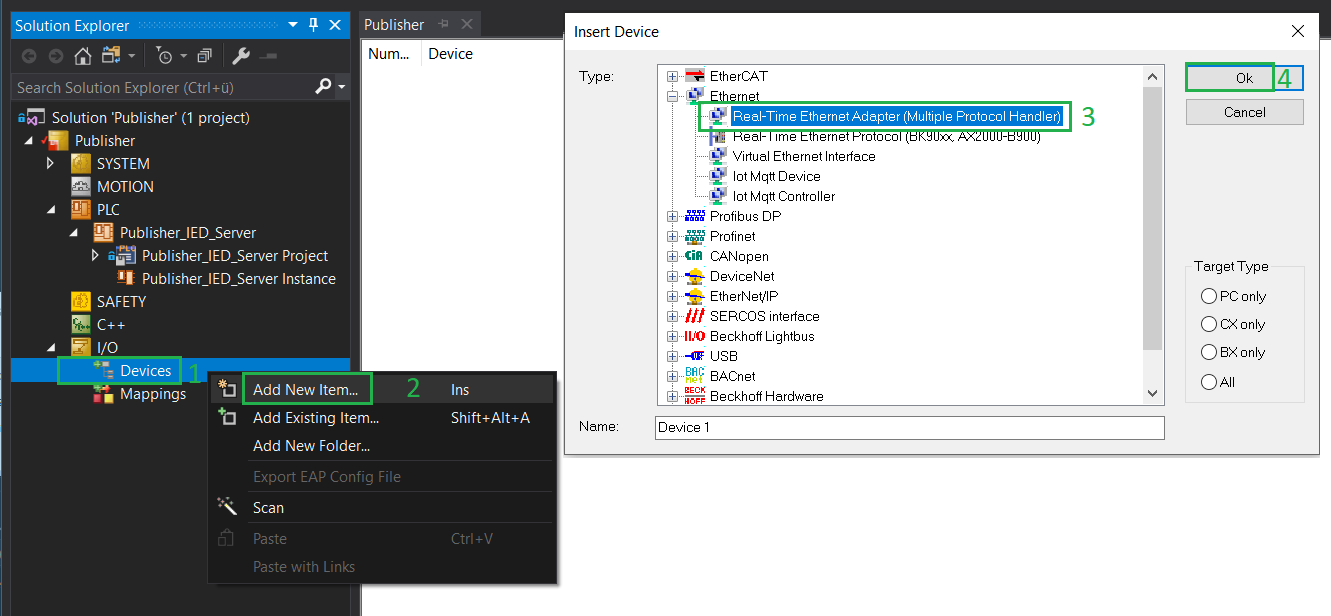
Adapter configuration
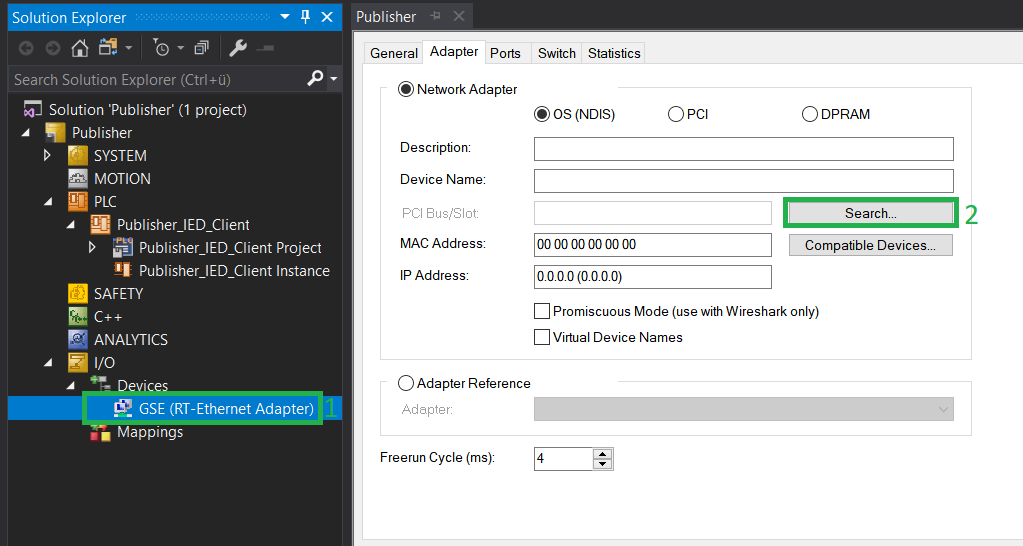
- Open the adapter properties dialog with a double left mouse click on the adapter.
- 1. Switch to the Adapter tab.
- 2. There select the command Search....
- 3. Select an adapter from the list of found adapters and confirm this with OK.
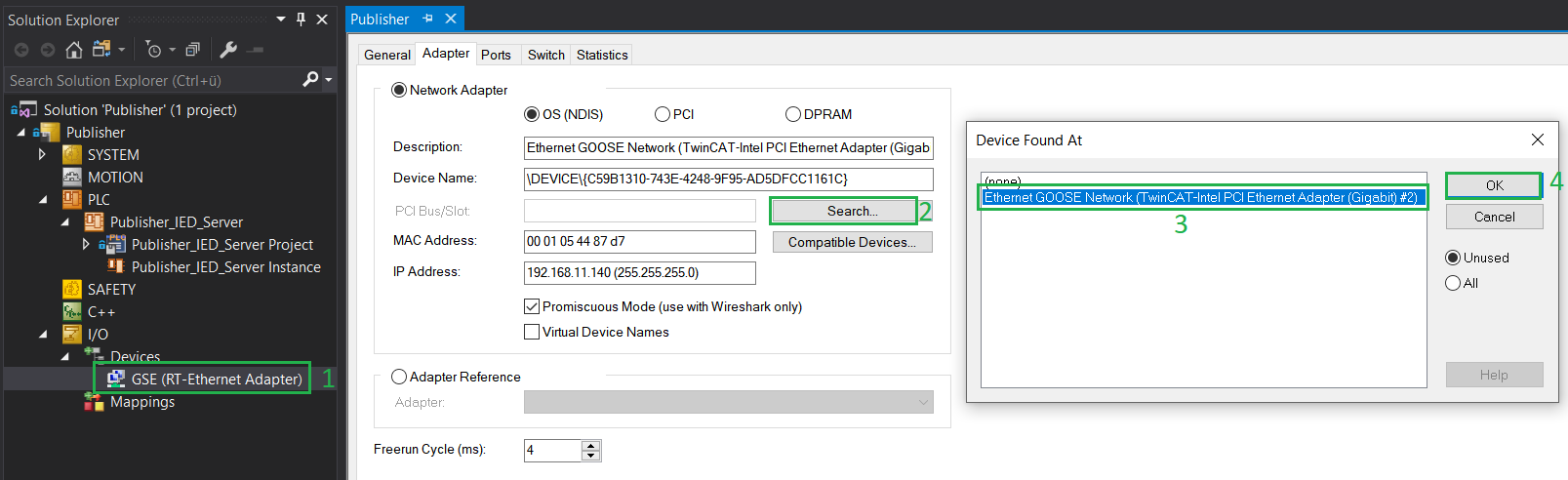
- This completes the adapter configuration. In the next step a link must be established between the adapter and the PLC function block instance.
Link adapter with PLC function block instance
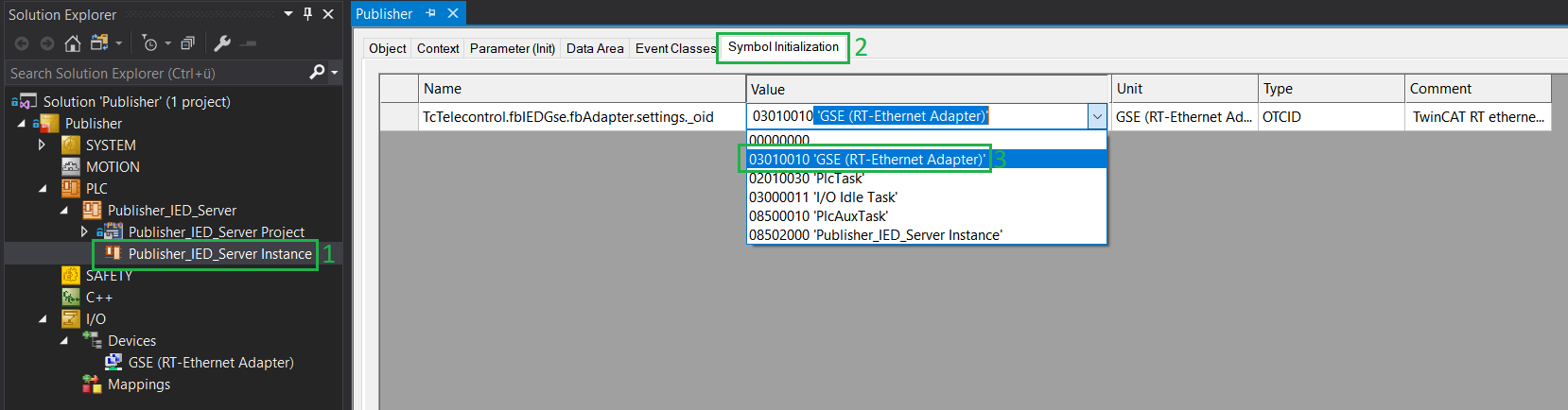
The link between the network adapter and the PLC function block instance is established via a so-called object ID (oid). The object ID's available in the project are displayed on the PLC project instance dialog under the Symbol Initialization tab. The project must have been previously compiled at least once for the tab and object IDs to appear. For Goose communication, these are the object IDs of the PLC function block instances of "FB_{IEDName}Gse" and for SV communication (9-2LE), these are the object IDs of the PLC function block instances of: "FB_{IEDName}_{LDName}_MSVCB01SvPublisher", "FB_{IEDName}_{LDName}_MSVCB02SvPublisher", "FB_{IEDName}_{LDName}_MSVCB01SvSubscriber" and "FB_{IEDName}_{LDName}_MSVCB02SvSubscriber" that are linked. The words in curly brackets are placeholders that are replaced with corresponding real values.
Notice | |
A real-time network adapter can be linked to a maximum of 20 PLC function block instances via the object ID. |
- Open the adapter properties dialog with a double left mouse click on the adapter.
- 1. Switch to the Symbol Initialization tab.
- 2. In the column Value select your network adapter GSE (RT Ethernet Adapter) from the drop-down box.
- 3. Save all changes in the solution.
The image below shows the SV Subscriber and its Object-IDS's configuration.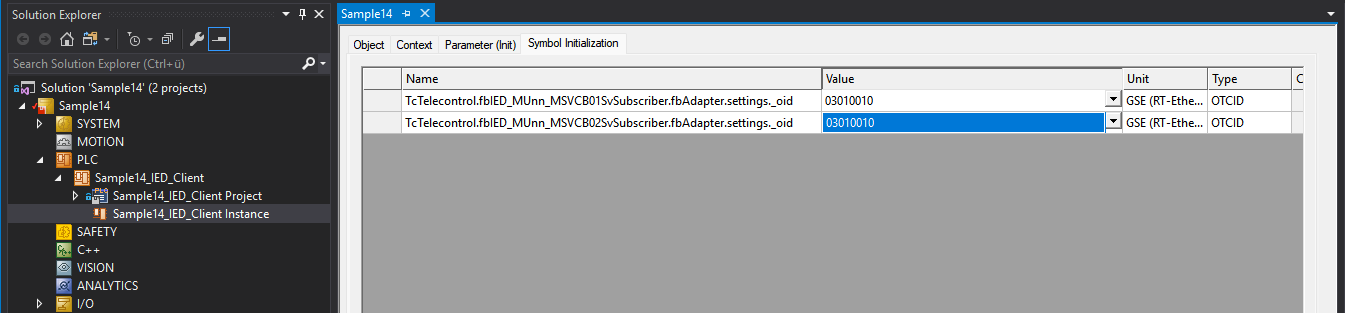
- This completes the configuration and linking of the real-time network adapter.