Mover
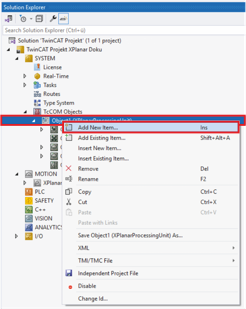
- ►Expand Solution Explorer > System > TcCOM Objects
- ►Right-click on Object (XPlanarProcessingUnit) to open the context menu
- ►Click Add New Item in the context menu
 | Determination of the mover type A universal mover object is added to the TcCOM objects at the beginning. The mover type is defined later in the Parameters (Init) tab. You can find more information on defining the mover type in chapter Mover. |
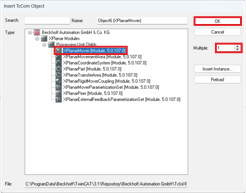
The Insert TcCOM Object dialog box opens.
- ►Click on the + button of the XPlanar Modules
- ►Click on the + button of the Processing Unit Childs to see the available TcCOM objects
- ►Select XPlanarMover [Module]
- ►Enter the number of movers required
- ►Double-click on the selection or confirm with OK
One or more movers are added to the Processing Unit.