MC_SetPosition
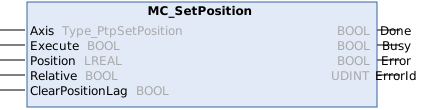
This function block shifts the coordinate system of an axis by manipulating both the setpoint position as well as the actual position of an axis with the same value without any movement caused (Re-calibration with same following error). This can be used for instance for a reference situation.
Syntax
Definition:
FUNCTION_BLOCK MC_SetPosition
VAR_INPUT
    Axis             : Type_PtpSetPosition;
    Execute          : BOOL;
    Position         : LREAL;
    Relative         : BOOL;
    ClearPositionLag : BOOL;
END_VAR
VAR_OUTPUT
    Done             : BOOL;
    Busy             : BOOL;
    Error            : BOOL;
    ErrorId          : UDINT;
END_VAR
 Inputs
|
Name |
Type |
Default |
Description |
|---|---|---|---|
|
Axis |
|
Reference to the axis | |
|
Execute |
BOOL |
|
Trigger the command with rising edge. |
|
Position |
LREAL |
#Invalid |
New position value ([PosUnit]) or distance if Relative = TRUE |
|
Relative |
BOOL |
false |
Shift axis position by value |
|
ClearPositionLag |
BOOL |
|
Resets position lag to zero. |
 Outputs
|
Name |
Type |
Description |
|---|---|---|
|
Done |
BOOL |
Position has new value. |
|
Busy |
BOOL |
Function block is not finished and new output values are to be expected. |
|
Error |
BOOL |
Error occurred within function block. |
|
ErrorId |
UDINT |
Error identifier |
Further information
The MC_SetPosition function block sets the current axis position to a parameterizable value. To do this, the axis must be at a standstill.
In the default case (input Relative = FALSE), the actual position is set to the parameterized absolute value of input Position. In the relative case (input Relative = TRUE), the actual position is offset by the value of the Position input. In both cases, the target position of the axis is set so that any potential position lag is retained. If the position lag is to be cleared, this can be done via the Options.ClearPositionLag input.
Note on the migration from NC2 to MC3
The Relative input corresponds to the Mode input of the Tc2_MC2.MC_SetPosition function block.
Version information
- TwinCAT Standard >= v3.1.4026.23.1
- TF5500 MC3 Base >= v4.0.6