MC_Power
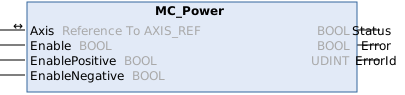
This function block controls the power stage (on or off).
Syntax
Definition:
FUNCTION_BLOCK MC_Power
VAR_IN_OUT
    Axis           : Reference To  AXIS_REF;
END_VAR
VAR_INPUT
    Enable         : BOOL;
    EnablePositive : BOOL;
    EnableNegative : BOOL;
END_VAR
VAR_OUTPUT
    Status         : BOOL;
    Error          : BOOL;
    ErrorId        : UDINT;
END_VAR
 Inputs
|
Name |
Type |
Default |
Description |
|---|---|---|---|
|
Enable |
BOOL |
|
General software enable for the axis |
|
EnablePositive |
BOOL |
false |
Feed enable in positive direction. Only effective if Enable = TRUE |
|
EnableNegative |
BOOL |
false |
Feed enable in negative direction. Only effective if Enable = TRUE |
 Outputs
|
Name |
Type |
Description |
|---|---|---|
|
Status |
BOOL |
Axis is ready for motion commands. |
|
Error |
BOOL |
Error occurred within function block or axis already signaling an error. |
|
ErrorId |
UDINT |
Error identifier of function block or axis |
Further information
The MC_Power function block is used to enable an axis in the software. The enable can be applied to both directions or only to a specific direction. A TRUE at the Status output indicates that the axis is ready for operation.
Depending on the drive type, Status also indicates that the drive is ready for operation. Digital drives provide feedback on operational readiness, while analog drives are unable to indicate their operational readiness. In the latter case Status only indicated operational readiness of the control side.
 | Hardware enable signal In addition to software enable it may be necessary to activate a hardware enable signal in order to enable a drive. This signal is not influenced by MC_Power and must be activated separately by the PLC. |
Effects on the axis state
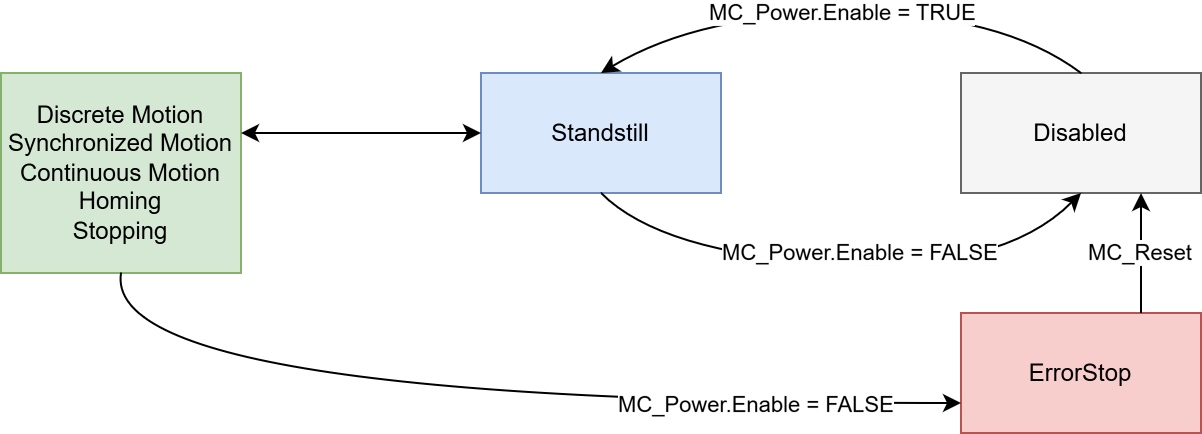
MC_Power.Enable affects the axis state as follows:
Note on the migration from NC2 to MC3
For MC3 axes, the override is set to 100% by default. The MC_SetOverride function block is available for setting the override.
Version information
- TwinCAT Standard >= v3.1.4026.23.1
- TF5500 MC3 Base >= v4.0.6