Link the axis object to the PLC
- An axis object has been created;
see Create axis object/add axis. - A PLC project containing an instance of Tc3_Mc3Ptp.AXIS_REF was created.
- 1. Compile the PLC project.
- The
FluidPowerAxis instance of the Tc3_Mc3Ptp.AXIS_REF is now displayed under the PLC instances in the Solution Explorer.
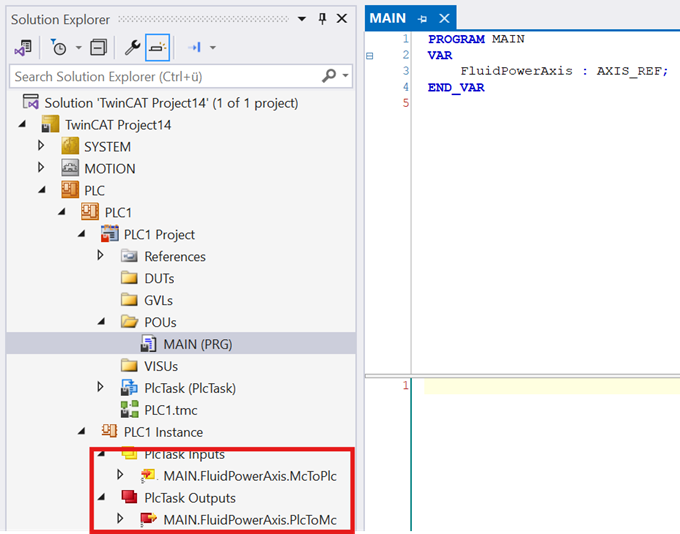
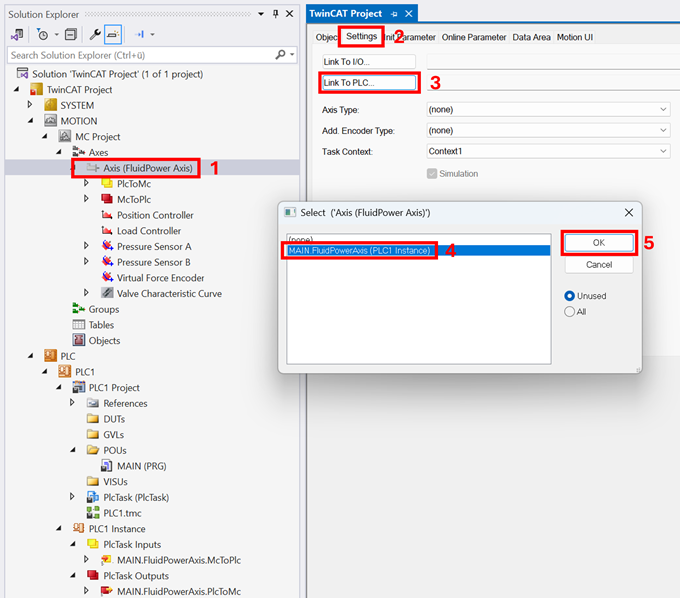
- 2. Link the PLC instance of the
Tc3_Mc3Ptp.AXIS_REF to the MC3 axis instance (steps 1–5).
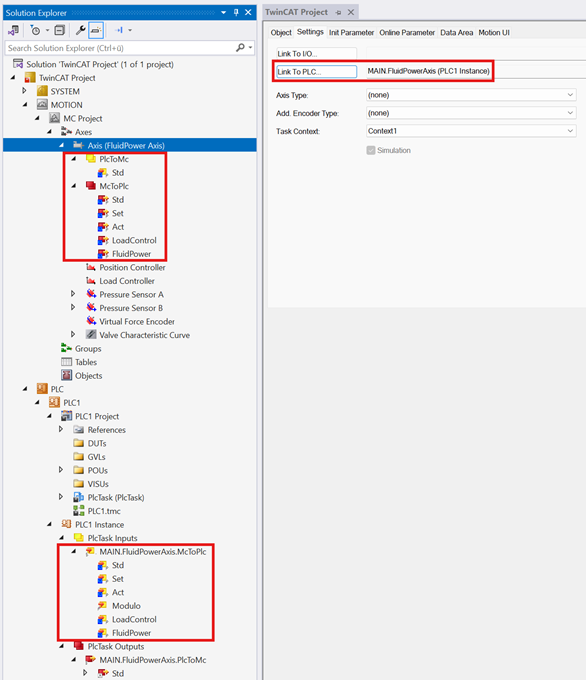
- The axis is now linked to the PLC.
- The text field next to the Link to PLC… button displays the linked instance of AXIS_REF in the PLC.
- In the Solution Explorer configuration within the project tree, a linked variable from the cyclic interface is indicated by a blue or white icon.
- 3. Activate the TwinCAT project.