Homing Cam
The Homing Cam object allows you to use a digital input as a reference signal for an initialization movement. To do this, a Binary Touch Probe object is nested within the object. This is how the Homing Cam device is used, for example, to link the signal from a digital input terminal or a PLC output as a reference signal. Signal analysis takes place within the context of the MET task. The homing procedure is configured in the Parameters (Init) tab.
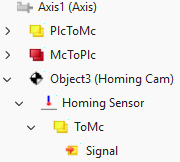
 | View of subordinate objects Depending on the Show Hidden Children setting in the context menu of an overlying parent object, child objects are hidden. Parameters and data areas of the child object are visible in the parent object when this setting is disabled.
|