MQTT
If you have chosen an MQTT target for a stream, the data is sent from the Analytics Logger to an MQTT message broker in packets. You can make the settings for the message broker in the target description.
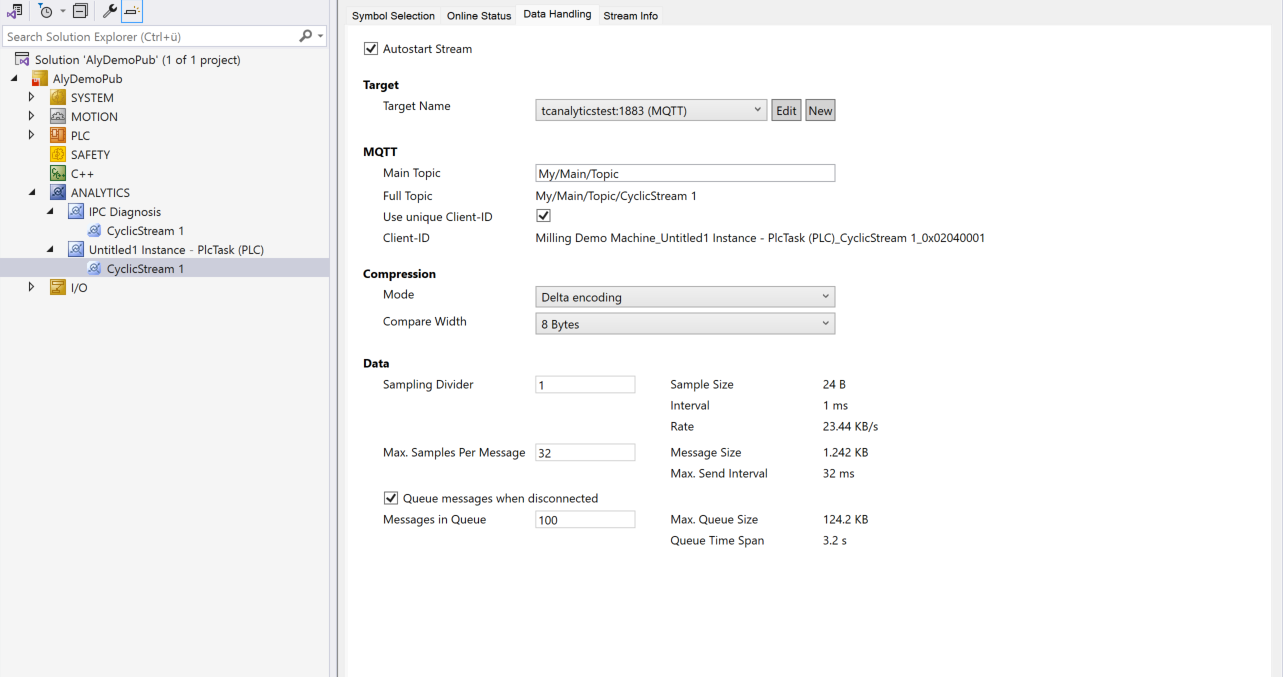
MQTT:
Main Topic: Enter your own unique main topic.
Example: Beckhoff/Verl/Production/Drives/Machine5
The Analytics Logger automatically adds its own specific subtopics.
Full Topic: The full topic is only a display for the main topic plus stream name.
Use unique Client-ID: If the checkbox is set, a client ID is automatically assigned. If the option is not chosen, the client ID is enabled and can be entered manually. Even then, it makes sense to choose a unique ID.
Client-ID: A client ID can be entered manually here if the Use unique Client-ID option is not chosen.
Data:
Sampling Divider: A value can be set to ensure that data is only acquired every n cycles. This results in a reduction in the sampling rate. The resulting sampling rate is given by 1/cycle time [s]/n in Hz. Example for 1 ms cycle time and sampling divider 1000: 1/0.001 s/1000 = 1 Hz.
Max. Samples Per Message: The maximum number of samples (cycles) that the Analytics Logger buffers before sending a message via MQTT.
Queue messages when disconnected: If you enable this option, the Analytics Logger automatically detects when the connection to the message broker is interrupted. It then temporarily stores the data locally. As soon as the connection is reestablished, the Analytics Logger sends the stored data.
Messages in Queue: Specify how many messages the Analytics Logger stores in the event of a communication interruption. The Analytics Logger displays the calculated timespan and the associated memory requirements.