MQTT
If you have chosen an MQTT target for a stream, the data is sent from the Analytics Logger to an MQTT message broker in packets. You can make the settings for the message broker in the target description.
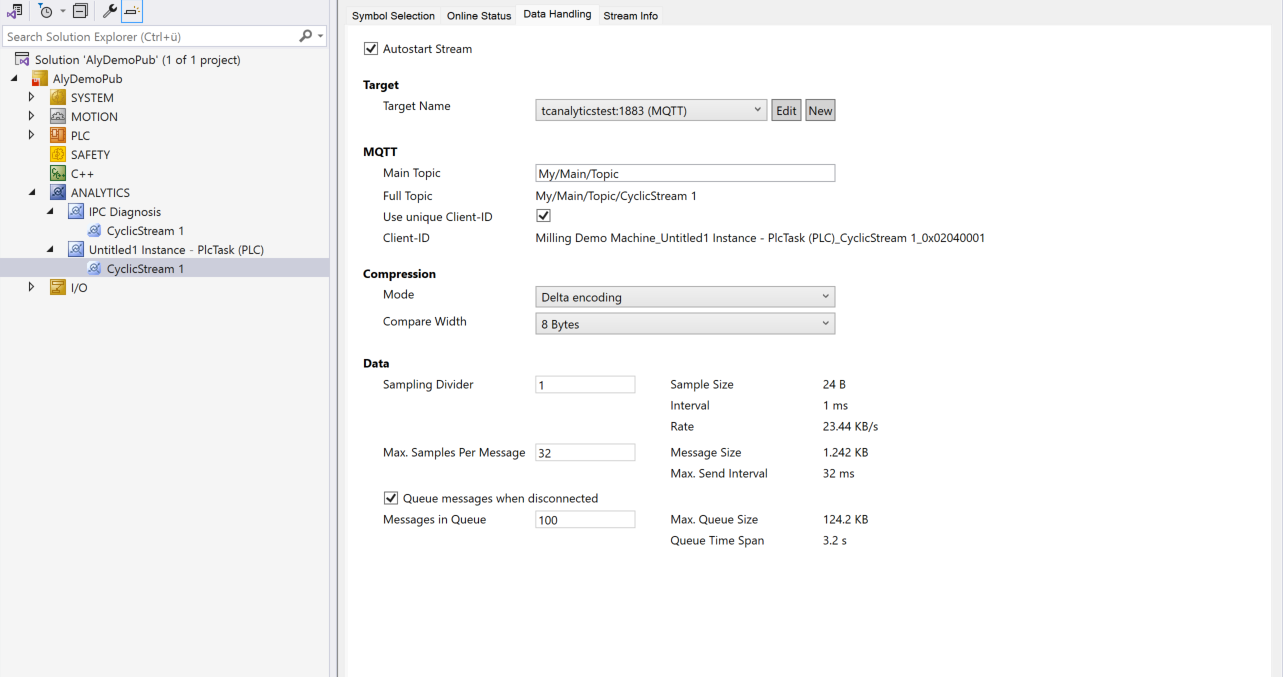
MQTT:
Main topic: It is possible to specify your own individual main topic.
Example: Beckhoff/Verl/Production/Drives/Machine5
The Analytics Logger automatically adds its own specific sub-topics.
Full topic: The full topic is only a display for the main topic plus stream name.
Use unique Client-ID: If the checkbox is set, a client ID is automatically assigned. If the option is not chosen, the client ID is enabled and can be entered manually. Even then, it makes sense to choose a unique ID.
Client ID: A client ID can be entered manually here if the Use unique Client ID option is not chosen.
Data:
Sampling Divider: A value can be set here to ensure that data is only acquired every n cycles. This results in a reduction in the sampling rate. The resulting sampling rate is given by 1/cycle time [s]/n in Hz. Example for 1ms cycle time and sampling divider 1000: 1/0.001s/1000 = 1Hz.
Max. Samples Per Message: This is the maximum number of samples (cycles) that are first buffered before a message is sent via MQTT.
Queue messages when disconnected: If this option is selected, it can be automatically recognized that the connection to the message broker has been interrupted. The data is then buffered locally. If the connection is re-established, the saved data is subsequently sent.
Messages in Queue: Here you can specify how many messages should be saved in the event of a communication interruption. The timespan calculated for this and the memory requirement are also displayed.